Drawing an Organizational Chart
Searching for Objects
To simultaneously add all the org-units involved in your processes that were not automatically inserted at diagram initialization:
1. In the query tool, select the Org-Unit object and click the Find button  .
.
.
The result dialog box appears.
2. Select the desired org-units holding the <Shift> key down.
 When you click on an object while holding down the Ctrl key, you add it to the list of selected objects if it was not previously selected, or you remove it from the selection if it was.
 3. Drag-and-drop the selected objects from the result dialog box into the diagram.
4. Draw the links between these org-units.
 Note that certain links might already exist.
When you create a link between two org-units, always drag from the org-unit higher in the hierarchy down to the subordinate. Once the link is drawn, an arrowhead indicates the direction of the hierarchy.
You can can associate business persons with an org-unit using the Person in the org-unit properties pane.
A business person holds a position in an organization. It is designated by its name. Example: Mr. Smith.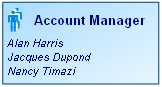
The name of the persons linked to the org-unit appear in the org-unit frame.
If the Person tab does not appear, you can associate System persons with the Characteristics tab in the Member section. For more details, see "How to manage options concerning business persons and (system) persons?". You can also add sites  where the org-units are located.
where the org-units are located. A site is a geographical location of an enterprise. Examples: Boston subsidiary, Seattle plant, and more generally the headquarters, subsidiaries, plants, warehouses, etc.
You must then draw the links between these objects. Note that certain links might already exist.
Specifying org-unit properties
To specify the properties of an org-unit:
1. Right-click the org-unit.
2. Select Properties.
When an org-unit appears in a diagram, you can describe it with a new organizational chart using its pop-up menu.3. In the Org-Unit-Type list box, select the org-unit type.
There are several types of org-units:
• Supplier
• Institution
• Company
• Public Department
• "Structure" (for example, Sales Management).
• Function (for example, Sales Engineer)
• Accountable (for example, Sales Manager)
• Generic: corresponds to a role to be played during a project (Writer, Requester).
You can also specify its details (company name, e-mail address, telephone number, etc.).