Using an Existing Organizational Process
To more closely detail behavior of a processing step such as an operation, you must replace it by an organizational process.
 An organizational process is a set of operations performed by org-units within a company or organization, to produce a result. It is depicted as a sequence of operations, controlled by events and conditions.
To use an existing organizational process:
1. Click the Organizational Process button and click in the diagram outside the frame of the described process.
button and click in the diagram outside the frame of the described process. The Add Organizational Process dialog box opens.
2. Click the arrow at the right of the Organizational Process field and select Connect Organizational Process in the drop-down list.
The list of organizational processes in the library appears in a dialog box.
3. Select the organizational process that interests you.
4. Click Connect.
5. Click OK (Web Front-End) or Finish (Windows Front-End) in the Add Organizational Process dialog box.
The organizational process appears in the diagram.
Accessing an Organizational Process Diagram
To access an organizational process diagram:
1. Right-click the process to open its pop-up menu.
2. Select Organizational Process Diagram.
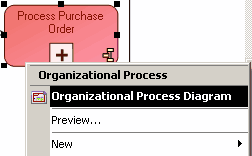
The diagram opens in a new window.
 If the process does not have a diagram, you can create it by clicking New in its pop-up menu.