Using Data Stores
Objects that are shared, supplied or used in processing can be stored in a data store.
 A data object is used to explain how documents, data, and other objects are used and updated during the process. A data object can represent an electronic document, or any other type of object, electronic or physical.
In the example below, data relating to suppliers is represented by the "Supplier Data" data store.
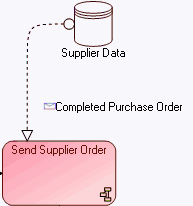
To create a data store:
1. Click the Data Store button in the insert toolbar.
button in the insert toolbar. If the button is not visible by default, click the diagram Views and Details button and select the "Data Stores" view.
2. Click in the diagram to position the object.
The Add Data Store dialog box appears.
3. Enter the name of the data store.
4. Click OK.
You can specify the content of message flows exchanged between the data store and the processes by creating message flows in your diagram.
A message flow represents circulation of information within an exchange contract. A message flow transports its content.For more details on flows, see paragraph Defining Message Flows.