Defining a Condition on a Sequence Flow
To define a condition on a sequence flow:
1. Right-click the sequence flow and select Properties.
2. In the dialog box that opens, select the Characteristics tab.
3. Click the arrow at the right of the Sequence Flow Type field.
4. Select "Conditioned" in the drop-down list.
5. In the Predicate field, specify the conditioning expression.
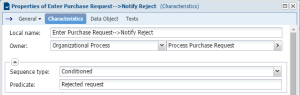
6. Click OK.
The text associated with the condition appears on the link which then takes form  .
.
.Defining a default condition on a sequence flow
If several conditioned sequence flows are from the same operation, you can specify that one of these should be used as default. For example, having completed the "Enter Purchase Request" operation, the assistant always executes the "Finalize Request" operation, except if the request is not acceptable and is below a given amount.
To define that a sequence flow is used by default:
1. Right-click the sequence flow and select Properties.
2. In the dialog box that opens, select the Characteristics tab.
3. Click the arrow at the right of the Sequence Flow Type field.
4. Select Default in the drop-down list.
5. Complete the Predicate text box if you wish to add a comment.
6. Click OK.
The link then takes form  .
.
.