Connecting Events to Sequence Flows
In a given context, a process can be connected to another process by a sequence flow.
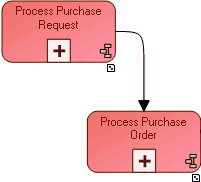
In the example above, the "Process Purchase Request" process precedes the "Process Purchase Order" process.
Displaying external processes
In the diagram describing the process, the preceding process can be displayed.
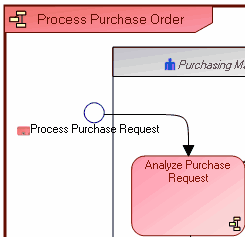
In the diagram that describes the "Process Purchase Order" process, the "Process Purchase Request" process that precedes it is shown.
To do this, it is necessary to specify the event involved in the sequence flow:
1. Right-click the sequence flow.
2. Select Properties in its pop-up menu.
The properties windows opens.
3. In the Characteristics tab, Triggered Event section, click the Connect button.
The research window opens.
4. Find Possible Triggered Events.
The list displayed proposes start events or catching events of the successor process.
 The successor process is generally triggered at its start and normally has only a single start event. This start event is therefore generally the event that interests you.
5. Select the event corresponding to the sequence flow.
6. Click Connect.
If you open the organizational process diagram containing this event, you can view the process that precedes it. For more details, see Accessing Preceding or Succeeding Processes.
You can similarly select the triggering event of the previous process. In this case, end events or throw events from the preceding process will be proposed.