Record of Data Flows
This report contains a list of all existing transfers of personal data, both towards subsidiaries and third parties.
To launch an instant report concerning data flows:
1. In the navigation menu select Follow-up and Reports > Record of data flows.
2. Select the data transfers you want to take into account in your report.
3. Click the Instant report button.
4. Select the type of presentation you wish to display.
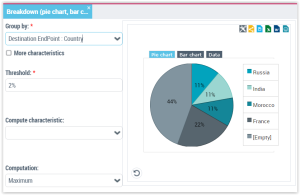
Example of instant report illustrating data transfers
 For more information, see "Managing Instant Reports".
To build a map displaying data transfers:
 Select the transfers of interest to you and click Reports > Cross-border transfer map.For more information, see Cross-border transfer map.