Consistency Report
This report displays the sub-processing activities which are not consistent with the general processing activity.
 For more information on sub-processing activities and general processing, see:
It detects the elements which were added on the sub-processing activity and are not present on the general processing activity.
The following data is analyzed:
• data categories
• data subjects
• data transfers
• data subject rights
Launching the Consistency report
To launch this report:
 In the navigation menu select Follow-up and Reports > consistency Report.You can also access this report from the processing activities list (from the navigation menu, select Record of processing).
Example of Consistency report
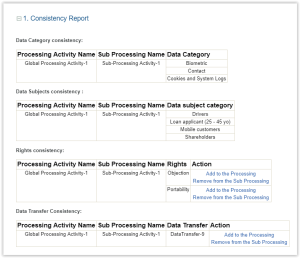
Handling processing/sub-processing inconsistencies
The Consistency report enables you to fix inconsistencies found between processing and sub-processing activities.
Inconsistencies concerning data subject rights and data transfers
To add a data subject right or a data transfer to the general processing:
In the corresponding Action column of the report select Add to the processing.To remove a data subject right or a data transfer from the general processing:
In the corresponding Action column of the report select Remove from the processing.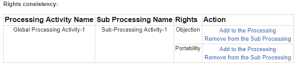
Inconsistencies concerning data subjects and data categories
The inconsistencies related to data subjects and data categories are also listed in this report.
However, you need to fix them manually. To do so:
1. Open the property page of the processing activity.
2. In the Details tab, select the sub-processing indicated in the report.
3. Compare the data subjects and data categories entered at the processing activity and sub-processing level.
4. Add or remove the elements concerned manually.

Examples of categories which need to be checked on the processing activity/sub-processing