Personal Data Risk Analysis
To create a data-related risk in HOPEX GDPR:
1. Open the processing activity properties.
2. In the Details > Personal Data Risk Analysis section, click New.
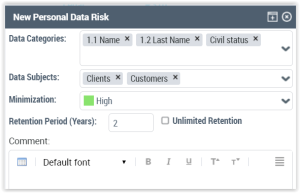
In this window you can specify the following information:
• Data categories
• Data subjects
• Minimization
• Retention period
Qualifying Minimization
Minimization is a important principle of the European Union's General Data Protection Regulation (GDPR).
According to article 5 of the GDPR, personal data should be adequate, relevant and limited to what is necessary in relation to the purposes for with they are processed. Additionally, data collected for one purpose cannot be repurposed without further consent.
Possible minimization values | Meaning |
|---|---|
Low/Very low | Too much information is used |
High | The information used is strictly what is needed |
The GDPR team can later give a compliance score for the Personal Data Risk section based on the information completed by the activity owner:
 Select a value from the Data Minimization Compliance Level drop-down menu.
 Viewing the computed risk
On creation of the data risk, the Risk is automatically computed based on the highest risk scale specified by the functional administrator in the Key elements section (for the concerned data categories and data subject categories).
 For more information on the initial risk scales filled in by the functional administrator, see Data categories and Data subject categories.
Specifying the retention period on a processing activity
Specifying a retention period on your processing activity is essential. The actual retention period may be determined by local laws.
After specifying the actual retention period, the goal retention period is compared to the actual one. The color of the icon indicates how compliant you are with your initial goal.
 The goal retention period corresponds to the lowest default retention period of the selected data categories.