Assessing Risks by Questionnaires
HOPEX Enterprise Risk Management enables assessment of your risks using standard questionnaires. In this way you can improve effectiveness of your internal control systems and minimize your risks.
Assessment questionnaires are sent by electronic mail to the appropriate addressees using customizable deployment modes.
Accessing Assessment Functions
Depending on user profile, you can access assessment functions via different menus.
|
Profile
|
Action
|
Menu
|
|---|---|---|
|
Functional Administrator
|
- Assign roles to persons of the enterprise
- Define the organization (entities, processes,...)
- Determine respondents (risk assessors for each entity)
|
Environment
Administration
|
|
Risk Manager
|
- Create assessment campaigns
- Create assessment sessions
- Follow up assessment sessions
|
Risk > Manage campaigns
|
|
Risk Assessor
|
- Accept or refuse questionnaires
Reply to questionnaires
|
Risk > Home > My Desktop > My Responsibilities > My Assessment Questionnaires
|
HOPEX Enterprise Risk Management Assessment Template
Before creating an assessment session, you must first create an assessment campaign and define its scope.
The scope of an assessment session is defined by specifying:
• The list of objects to be assessed and characteristics to be assessed on each of the objects.
• The assessment context: which entities, etc.
• The assessment period.
This scope is defined generically at the level of an assessment campaign by an assessment template.
 An assessment template is used as a model for creating campaigns and assessment sessions. The assessment template defines the assessment scope, the questionnaire template to be used, and if required, the aggregation schemas to be applied for interpretation of global results.
All sessions of the same campaign therefore relate to a globally identical scope.
 It remains possible for the session manager to remove or add elements to the scope specific to a session.
Accessing assessment templates
An assessment template is proposed as standard with HOPEX Enterprise Risk Management. Its objective is to obtain an assessment of risks related to an entity.
To access the assessment template:
 Select Risk > Campaign Management > Campaign Management > Preparation > Questionnaire Templates.
The "Risk Assessment" assessment template appears.
This template is the same as that used in the framework of direct assessment.For more details on the use of this assessment template, see Assessment template detail.The proposed assessment template uses:
• assessed characteristics
• a questionnaire template
Assessed characteristics
An assessed characteristic defines what the assessment seeks to assess. It can be associated with a MetaClass, and more specifically with one of its MetaAttributes, for example: Risk MetaClass, MetaAttribute: LikelihoodTo access the list of assessed characteristics proposed as standard by HOPEX Enterprise Risk Management:
In the Risk desktop, click Campaign Management > Campaign Management > Preparation > Assessed Characteristics.The list of characteristics appears in the edit area.
These characteristics relate to risk attribute values.
For each of these attributes, the characteristic assessed can relate to the gross value, maximum value or the average.• Impact: characterizes impact of the risk when it occurs.
• Likelihood: characterizes probability that the risk will occur.
• Inherent Risk: gives an assessment of risk consequences.
The inherent (or gross) risk indicates the risk to which the organization is exposed in the absence of measures taken to modify the occurrence likelihood or impact of this risk. This is the result of multiplying impact value and likelihood value before taking account of risk prevention or reduction measures.• Control Level: this characteristic gives an overall assessment of risk control level.
• Net Risk: is the difference between the Inherent Risk and the Control Level.
Questionnaire template
A questionnaire template represents definition of questionnaire content: question group, questions, unique or multiple answers and possible answers. It can be associated with a questionnaire presentation specifying display options. Questionnaires sent to assessors are generated from the definition supplied in the questionnaire template.To access the questionnaire template proposed as standard by HOPEX Enterprise Risk Management:
In the Risk desktop, click Campaign Management > Campaign Management > Preparation > Questionnaire Templates.This questionnaire template relates to assessment of risks from the following characteristics:
• Impact: characterizes impact of the risk when it occurs.
• Likelihood: characterizes probability that the risk will occur.
• Control Level: characterizes efficiency level of control elements deployed (controls) to reduce the risk
Assessment template detail
An assessment template is used as a model for creating campaigns and assessment sessions. The assessment template defines the assessment scope, the questionnaire template to be used, and if required, the aggregation schemas to be applied for interpretation of global results.The "Risk Assessment" assessment template supplied with HOPEX Enterprise Risk Management produces a risk assessment related to an entity.
Assessed characteristics
An assessed characteristic defines what the assessment seeks to assess. It can be associated with a MetaClass, and more specifically with one of its MetaAttributes, for example: Risk MetaClass, MetaAttribute: LikelihoodAssessed characteristics are as follows:
• Impact
• Likelihood
• Inherent risk
The inherent (or gross) risk indicates the risk to which the organization is exposed in the absence of measures taken to modify the occurrence likelihood or impact of this risk. This is the result of multiplying impact value and likelihood value before taking account of risk prevention or reduction measures.• Control level
Control level characterizes efficiency level of control elements deployed (controls) to assess the risk.• Net risk
The residual (or net) risk indicates the risk to which the organization remains exposed after management has processed the risk. is the difference between the Inherent Risk and the Control Level.Assessed objects
The objects assessed are risks.
The list of risks to be assessed comprises all risks connected to the entity (assessment object) and to its sub-entities
Respondents
Respondents are persons defined as Risk Assessor for the entity.
Questionnaire
A questionnaire proposes a list of predefined questions that can be applied to an event type, control, document, etc.The questionnaire relates to characteristics to be assessed for all risks determined as objects of assessment:
• Impact
• Likelihood
• Control level
Control level characterizes efficiency level of control elements deployed (controls) to assess the risk.Aggregation schema
Each specified assessment value is carried by an "assessment node" which describes specified value for a characteristic of a given object (risk, entity or process) in a specific context defined by an entity, a respondent, a process.
"Assessment nodes" can be represented in tree form from a root node, which can be:
• A risk
• An entity
• A process
• A risk type
• An objective
Each node carries all values defined in the assessed characteristics. Results of the aggregation of these values produce aggregation reports.
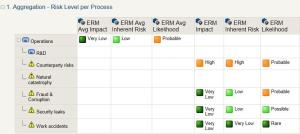 An aggregation schema is a series of steps enabling consolidation of assessment results according to specified assessment rules.
Aggregation schemas of the HOPEX Enterprise Risk Management assessment template define the calculation mode:
• Gross values for each risk.
In the aggregation report example, values presented are: impact, lilelihood, control level, inherent risk and net risk.
• Calculated values (maximum and average) on entities, processes and risk types.
In the aggregation report example, values presented are: average values calculated on all risks of a process for impact, likelihood and net risk.
Values associated with a risk 'Ri' are calculated from values given to this risk on each of the entities 'Ej' to which it relates. Assessment nodes taken into account are linked to pairs (Ri, Ej)
• Impact of Ri = Max and Average {Impact of (Ri, Ej) for all j}
• Likelihood of Ri = Max and Average {Likelihood of (Ri, Ej) for all j}
• Inherent risk of Ri = Max and Average {Inherent risk of (Ri, Ej) for all j}
• Control level of Ri = Max and Average {Control level of (Ri, Ej) for all j}
• Net risk of Ri = Max and Average {Net risk of (Ri, Ej) for all j}