Appendix
Recommended file permissions for the HOPEX installation
In this section, it assumed that only the administrator can:
• Perform administration actions (create environment, create repository…).
• Deploy customized resources (custom .jar files, custom files in Mega_usr).
• Deploy licences.
• Install Solution Packs.
• Uncompress documentation in Javadoc format.
Reading table
You may configure advanced file permissions:
|
Right / Windows permission
|
Read & execute
|
Modify
|
Delete denied
|
|
Read
|
X
|
|
|
|
Update no delete
|
X
|
X
|
X
|
|
Update and delete
|
X
|
X
|
|
Permissions for the license folder (Must license)
|
File
|
Location
|
Administrator rights
|
User rights
|
|
*.must
|
Parent license folder containing a .must license file (ex: License-Y999.must)
Example:
\\server001\Apps\Licenses
|
Update and delete
|
Update no delete
|
|
*.*
|
License subfolder (hidden, created dynamically when license is used)
Example:
\\server001\Apps\Licenses\License-Y999
|
Update and delete
|
Update and delete 1
|
1 By default, user files and token files are set as 'Not visible'.
Event smarter permission can be defined. See the article 'Must License Installation Guide HOPEX V2R1 EN'.
Permissions for the license folder (ELF license)
|
File
|
Location
|
Administrator rights
|
User rights
|
|
*.elf
|
Parent license folder containing the .elf license file (ex: L1345.elf).
Example:
\\server001\Apps\Licenses
|
Update and delete
|
Read
|
Permissions for the shared configuration folder
|
File
|
Location
|
Administrator rights
|
User rights
|
|
*.*
|
Shared configuration folder containing the megasite.ini file. Example: =\\mega\data\config
|
Update and delete
|
Update no delete
|
Permissions for HOPEX installation folders (%programfiles(x86)%)
By defaut, core programs are installed on %programfiles(x86)%\MEGA\V2R1.
|
File
|
Location
|
Administrator rights
|
User rights
|
|---|---|---|---|
|
*.*
|
<Installation folder> and subfolders ( Documentation, DotNet\Assemblies, Install, java, Mega_Std, System, Utilities). Main programs
|
Update and delete
|
Read
|
|
*.*
|
<Installation folder>\Cfg
|
Update and delete
|
Read (1)
|
|
*.*
|
<Installation folder>\DotNet\Assemblies_usr
|
Update and delete
|
Read (1)
|
|
*.*
|
<Installation folder>\java\lib_usr
|
Update and delete
|
Read (1)
|
|
*.*
|
<Installation folder>\Mega_Usr
|
Update and delete
|
Read (1)
|
|
*.*
|
<Installation folder>\Utilities\Solution Pack
|
Update and delete
|
Read (1)
|
(1) To facilitate the work of developer on HOPEX, it is advised to configure 'Update and delete' for this folder.
Permissions for HOPEX installation folders (%programfiles%)
By defaut, Redis component is installed on %programfiles%\MEGA\V2R1.
|
File
|
Location
|
Administrator rights
|
User rights
|
|---|---|---|---|
|
*.*
|
<Installation folder> and subfolders
|
Update and delete
|
Read
|
Permissions for HOPEX Environment folders
Note that most folders are created dynamically during use of HOPEX.
|
File
|
Location
|
Administrator rights
|
User rights
|
|---|---|---|---|
|
*.*
|
<Environment folder>
Environment main folder.
|
Update and delete
|
Read
|
|
*.*
|
<Environment folder>\Db
Root repository folders.
|
Update and delete
|
Read
|
|
*.*
|
<Environment folder>\Db\<Repository>
Repository folder.
• If the repository is stored in the GBMS storage format (default), each HOPEX Repository consists of 4 files (.EMA, .EMB, .EMS, EMV).
• If the repository is stored in Oracle, each HOPEX Repository consists of 2 files (. EMV, .EMO) and files on the database server.
• If the repository is stored in SQL Server, each HOPEX Repository consists of 2 files (. EMV, .EMQ) and files on the database server.
|
Update and delete
|
Update no delete
|
|
*.*
|
<Environment folder>\Db\<Repository>\<Approve>
Default folder for reports (MS Word) detached from HOPEX. This folder can be configured (optional).
|
Update and delete
|
Update and delete
|
|
*.*
|
<Environment folder>\Db\<Repository>\Document
Default folder reports (MS Word). This folder can be configured (optional).
|
Update and delete
|
Update and delete
|
|
*.*
|
<Environment folder>\Db\<Repository>\<Repository>.Lock
Folder of data repository locks for GBMS storage. One file (.EMK) per lock placed. These files can be created and deleted during use of HOPEX
|
Update and delete
|
Update and delete
|
|
*.*
|
<Environment folder>\Db\<Repository>\<Repository>.ix
Folder of full search indexes. These files can be created and deleted during use of HOPEX
|
Update and delete
|
Update
|
|
*.*
|
<Environment folder>\Db\<Repository>\<Repository>.Log
Folder of data repository logfile. One file (.MGL) per administration session or per private workspace dispatched. These files can be created and deleted during use of HOPEX.
|
Update and delete
|
Update and delete
|
|
*.*
|
<Environment folder>\Db\<Repository>\<Repository>.Transactions
Folder of private workspace for data repositories (for GBMS storage only) and repository backup logfile (for all types of storage).
If the repository is stored in the GBMS format (default), each private workspace consists in two files (.EMB and .EMS). These files are created on opening a private workspace and deleted at each dispatch.
One file (.MGL) per administration session or per private workspace dispatched. These files can be created and deleted during use of HOPEX.
|
Update and delete
|
Update and delete
|
|
*.*
|
<Environment folder>\Db\<Repository>\USER and sub-folders
Personal folders of the users.
|
Update and delete
|
Update and delete
|
|
*.*
|
<Environment folder>\Db\<Repository>\WORK and sub-folders
Working folder for administration of repository.
|
Update and delete
|
Update and delete
|
|
*.*
|
<Environment folder>\Intranet
Default root folder for static HTML page generation.
This folder can be configured (optional).
|
Update and delete
|
Update and delete
|
|
*.*
|
<Environment folder>\Mega_user
Folder containing customized resources (.MGS, .DOT files)
|
Update and delete
|
Read
|
|
*.*
|
<Environment folder>\SysDb
Folder of system repository. It consists of 4 files (SystemDb.ema, SystemDb.emb, SystemDb.ems, SystemDb.emv)
|
Update and delete
|
Update no delete
|
|
*.*
|
<Environment folder>\SysDb\SystemDb.Log
Folder of system repository logfile. One file (.MGL) per administration session or per private workspace dispatched. These files can be created and deleted during use of HOPEX.
|
Update and delete
|
Update and delete
|
|
*.*
|
<Environment folder>\SysDb\SystemDb.Lock
Folder of system repository locks for GBMS storage. One file (.EMK) per lock placed. These files can be created and deleted during use of HOPEX.
|
Update and delete
|
Update and delete
|
|
*.*
|
<Environment folder>\SysDb\SystemDb.Transactions
Folder of private workspaces for system repository (for GBMS storage only) and repository backup logfile (for all types of storage).
If the repository is stored in the GBMS format (default), each private workspace consists in two files (.EMB and .EMS). These files are created on opening a private workspace and deleted at each dispatch.
|
Update and delete
|
Update and delete
|
|
*.*
|
<Environment folder>\SysDb\USER and sub-folders
Folder of user reports (<user code>.TXT)
|
Update and delete
|
Update and delete
|
|
*.*
|
<Environment folder>\SysDb\WORK and sub-folders
Working folder for administration of system repository.
|
Update and delete
|
Update and delete
|
Example of command lines for HOPEX Web Front-End
Recommended command line for Web Application Server (web standalone installation):
C:\WINDOWS\system32\msiexec.exe
/package "\\Srv001\Master\HOPEX\DISK1\HOPEX V2R1.msi"
/passive
/levw "C:\tmp\ScriptInstall.log"
SELECTED_LANGUAGE="1033"
ADDLOCAL="ALL"
ALLUSERS="1"
INSTALLDIR="C:\Program Files (x86)\MEGA\HOPEX V2R1"
IS_NET_API_LOGON_USERNAME_HOPEX="<mydomain>\<myuser>" IS_NET_API_LOGON_PASSWORD_HOPEX="<mypassword>"
IS_NET_API_LOGON_USERNAME_API="<mydomain>\<myuser>" IS_NET_API_LOGON_PASSWORD_API="<mypassword>"
WEBPORTAL_USERNAME="<mydomain>\<myadminuser>"
WEBPORTAL_PASSWORD="<myadminpassword>"
WITHSSL="0"
Note:
• The above command line is displayed though seveval lines for better understanding.
Result:
• HOPEX core programs are installed
• The system of the machine is updated (registry, libraries).
• Windows Service are installed
o HOPEX Site Service Provider
o HOPEX Service Watchdog
o HopexRedisBackEnd
• Redis client programs are installed.
• Different IIS applications are installed on the target web server
o Hopex
o Hopex2
o HOPEXAdministration
o HOPEXAPI
o HOPEXPIMWAS
o HOPEXLicenceManager
o HOPEXMonitor
o HOPEXMWAS
o HOPEXSupervision
o MegaSSP
o UAS
o WindowsAuthenticationService
Recommended command line for SSP Server:
C:\WINDOWS\system32\msiexec.exe
/package "\\Srv001\Master\HOPEX\DISK1\HOPEX V2R1.msi"
/passive
/levw "C:\tmp\ScriptInstall.log"
SELECTED_LANGUAGE="1033"
ADDLOCAL="ALL"
REMOVE="HOPEX,HOPEX_MWAS,HOPEX_API,HOPEX_API_MWAS,HOPEX_UAS,HOPEX_CONSOLES_PORTAL"
ALLUSERS="1"
INSTALLDIR="C:\Program Files (x86)\MEGA\HOPEX V2R1"
IS_NET_API_LOGON_USERNAME_HOPEX="<mydomain>\<myuser>" IS_NET_API_LOGON_PASSWORD_HOPEX="<mypassword>"
IS_NET_API_LOGON_USERNAME_API="<mydomain>\<myuser>" IS_NET_API_LOGON_PASSWORD_API="<mypassword>"
WEBPORTAL_USERNAME="<mydomain>\<myadminuser>"
WEBPORTAL_PASSWORD="<myadminpassword>"
WITHSSL="0"
CLUSTERDIR="<configuration root path (clusterrootpath)>"
Note:
• The above command line is displayed though seveval lines for better understanding.
Result for SSP server:
• HOPEX core programs are installed
• The system of the machine is updated (registry, libraries).
• Windows Service are installed
o HOPEX Site Service Provider
o HOPEX Service Watchdog
o HopexRedisBackEnd
• Redis client programs are installed.
• The system of the machine is updated (registry, libraries).
• Windows Service 'HOPEX Site Service Provider' is installed
• Different IIS applications are installed on the target web server
o MegaSSP
• The local configuration file (Megasite.ini) contains the reference of the shared configuration folder. Example:
[LAN]
clusterrootpath=\\mega\data
Recommended command line HOPEX Web Application Server nodes:
C:\WINDOWS\system32\msiexec.exe
/package "\\Srv001\Master\HOPEX\DISK1\HOPEX V2R1.msi"
/passive
/levw "C:\tmp\ScriptInstall.log"
SELECTED_LANGUAGE="1033"
ADDLOCAL="ALL"
REMOVE=" HOPEX_SITE_SERVICE_PROVIDER"
ALLUSERS="1"
INSTALLDIR="C:\Program Files (x86)\MEGA\HOPEX V2R1"
IS_NET_API_LOGON_USERNAME_HOPEX="<mydomain>\<myuser>" IS_NET_API_LOGON_PASSWORD_HOPEX="<mypassword>"
IS_NET_API_LOGON_USERNAME_API="<mydomain>\<myuser>" IS_NET_API_LOGON_PASSWORD_API="<mypassword>"
WEBPORTAL_USERNAME="<mydomain>\<myadminuser>"
WEBPORTAL_PASSWORD="<myadminpassword>"
WITHSSL="0"
CLUSTERDIR="<configuration root path (clusterrootpath)>"
Note:
• The above command line is displayed though seveval lines for better understanding.
Result for HOPEX Web Application Server nodes:
• HOPEX core programs are installed
• The system of the machine is updated (registry, libraries).
• Windows Service are installed
o HOPEX Service Watchdog
o HopexRedisBackEnd
• Redis client programs are installed.
• Different IIS applications are installed on the target web server
o Hopex
o Hopex2
o HOPEXAdministration
o HOPEXAPI
o HOPEXPIMWAS
o HOPEXLicenceManager
o HOPEXMonitor
o HOPEXMWAS
o HOPEXSupervision
o UAS
o WindowsAuthenticationService
• The local configuration file (Megasite.ini) contains the reference of the shared configuration folder. Example:
[LAN]
clusterrootpath=\\mega\data
List of program features displayed in the setup wizard
|
Program feature
|
Comment
|
Installation feature (internal)
|
|
HOPEX BackEnd
|
|
BackEnd
|
|
MEGA Web Access for Hopex API
|
Installs IIS application 'HOPEXAPIMWAS' on IIS
|
HOPEX_API_MWAS
|
|
MEGA Web Access for Hopex
|
Installs IIS application 'HOPEXMWAS' on IIS
|
HOPEX_MWAS
|
|
HOPEX Site Service Provider
|
Installs SSP component/service on IIS
|
HOPEX_SITE_SERVICE_PROVIDER
|
|
HOPEX FrondEnd
|
Installs IIS application 'HOPEX' and 'HOPEX2' on IIS
|
FrontEnd
|
|
HOPEX (IIS)
|
Installs IIS application 'HOPEX' and 'HOPEX2' in IIS
|
HOPEX
|
|
HOPEX API
|
Installs IIS application 'HOPEXAPI' on IIS
|
HOPEX_API
|
|
Hopex Unified authentication service
|
Installs IIS applications 'UAS' and 'WindowsAuthenticationService' on IIS
|
HOPEX_UAS
|
|
Hopex Console Portal
|
Installs IIS application for HOPEX Web Consoles on IIS
|
HOPEX_CONSOLES_PORTAL
|
|
Hopex Administration
|
Installs IIS application 'HOPEXAdministration' on IIS
|
HOPEX_WADMIN
|
|
Hopex Web Supervision
|
Installs IIS application 'HOPEXSupervision' on IIS
|
HOPEX_WSUP
|
|
HOPEX License Manager
|
Installs IIS application 'HOPEXLicenceManager' on IIS
|
HOPEX_WLIC
|
|
HOPEX Web Monitor Manager
|
Installs IIS application 'HOPEXMonitor' on IIS
|
HOPEX_WMON
|
|
MEGA software
|
Installs core programs (by default in %programfiles(x86)%\MEGA\HOPEX V2R1)
|
MEGA
|
|
Redis Client executable
|
Installes redis component (by default in %programfiles\MEGA\HOPEX V2R1)
|
Redis_SBS
|
|
Administration Program
|
Installs a launcher Administration.exe in the root folder of core programs
|
Administration.exe
|
|
MUST License Management Program
|
Installs a launcher licensing.exe in the root folder of core programs
|
Licensing.exe
|
|
Utilities
|
Installs utilities in a subfolder '\Utilities' of the root folder of core programs
|
See table below
|
|
MEGA Documentation
|
Installs documentation in PDF format in a subfolder '\Documentation' of the root folder of core programs
|
Documentation
|
|
Debugging files
|
Installs additional files for debugging purpose in a subfolder '\System' of the root folder of core programs
|
MEGA.DebugSymbol
|
Embedded Internet Explorer
Certain features of Windows Front-End (start page, diagram creation wizard in graphic mode) use Internet Explorer in embedded mode. This use of Internet Explorer can be impacted by system settings.
If features are not running as expected (ex: creation of diagram), it is recommended to configure trusted sites in Internet Explorer as follows:
Pre-requisite:
Identify the network name of the machine that hosts the HOPEX Environment, ex S0045008.
Procedure:
1. Run Internet Explorer.
2. From the Tools menu, select Internet Options.
3. In Security tab, select 'Trusted sites' and click Sites.
The 'Trusted sites' window is displayed.
The 'Trusted sites' window is displayed.
4. Uncheck 'Require server verification (https:) for all sites in this zone'.
5. Enter the network name of the machine identified before (ex S0045008), and add it to the trusted sites.
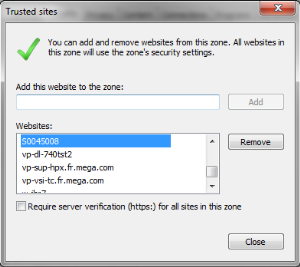
Notes:
• Even if you use a different HTML Browser, this configuration is relevant. It affects the behavior of Internet Explorer in embedded mode that is independent from the HTML browser used.
• If this configuration is not allowed (security policies), ask the local system administrator to perform it.
For Citrix, this configuration is required for all users of HOPEX. ask the local system administrator to perform it using Windows GPO (Group Policy Object).
Complete list of installation features
|
Installation feature (internal)
|
Comment
|
Target folder
|
|---|---|---|
|
Administration.exe
|
Installs Administration.exe
|
INSTALLDIR
|
|
Data.Extractor
|
Installs MEGA Data Extractor utility
|
INSTALLDIR\Utilities\MEGA Data Extractor
|
|
Documentation
|
Installs documentation
|
INSTALLDIR\Documentation
|
|
EnvComparator
|
Installs MEGA Customisation Analyser utility
|
INSTALLDIR\Utilities\MEGA Customisation Analyser
|
|
Install
|
Installs the folders 'Advance Reporting', 'Compatibility Tools', 'Doors', 'Languages'
|
INSTALLDIR\Install
|
|
Install.DBMS
|
Install RDBMS related resources
|
INSTALLDIR\Install\RDBMS client
|
|
Install.Licenses
|
Installs the folder 'Licenses'
|
INSTALLDIR\Install\Licenses
|
|
Install._GR
|
Installs the _GR files, Upgrade files, preinstalled SystemDb (GBMS), predefined system business documents
|
INSTALLDIR\Install
|
|
Licensing.exe
|
Install Licensing.exe
|
INSTALLDIR
|
|
MEGA
|
Installs HOPEX.exe, binary files and resources (folders 'java', 'Mega_std', 'System' and '\Utilities\Solution Pack')
|
INSTALLDIR
|
|
MEGA.DebugSymbol
|
Install PDB files (optional)
|
INSTALLDIR\System
|
|
Optional.File
|
Installs optional .mol files
|
INSTALLDIR\Mega_Std
|
|
Optional.Moka_Reference
|
Installs MOKA related resources
|
INSTALLDIR\Mega_Std\Moka Reference
|
|
RDBMS_Diagnostic
|
Installs RDBMS Diagnostic tool
|
INSTALLDIR\Utilities\RDBMS Diagnostic
|
|
System.FlexGrid
|
Redistributable file system Microsoft FlexGrid
|
%systemroot%
|
|
System.GDIplus
|
Redistributable file system Microsoft GDI +
|
%systemroot%
|
|
System.MSXML
|
Redistributable file MS XML3
|
%systemroot%
|
|
System.Redist
|
Redistributable file system
|
%systemroot%
|
|
System.Scripting56
|
Redistributable file system Windows Scripting Host 5.6
|
%systemroot%
|
|
System.VB6
|
Redistributable file system VB6 Runtime
|
%systemroot%
|
|
System.VC8
|
Redistributable file system VC8
|
%systemroot%
|
|
System.VC10
|
Redistributable file system VC10
|
%systemroot%
|
|
System.VC15
|
Redistributable file system VC15
|
%systemroot%
|
|
System.WData
|
Redistributable file system WebData std library
|
%systemroot%
|
|
Test.Utilities
|
Installs utilities:
HOPEX Server Supervisor utility, RDBMS Diagnostics…
|
INSTALLDIR\Utilities
|
|
Utilities
|
Installs utilities and resources:
MEGA Mail Test utility, transport order (Solman)
|
INSTALLDIR\Utilities
|
|
HOPEX
|
Installs IIS application 'HOPEX' and 'HOPEX2' in IIS
|
IISROOT\wwwroot\HOPEX
|
|
HOPEX_MWAS
|
Installs IIS application 'HOPEXMWAS' in IIS
Installs service 'HOPEX Service Watchdog'
|
IISROOT\wwwroot\HOPEXMWAS
IISROOT \wwwroot\MegaMSW
<registry>
|
|
HOPEX_SITE_SERVICE_PROVIDER
|
Installs IIS application 'MegaSSP' in IIS
Installs services 'HOPEX Site Service Provider and 'HOPEX Service Watchdog'
|
IISROOT\wwwroot\MegaSSP
<registry>
|
|
HOPEX_API
|
Installs 'HOPEX API
|
IISROOT\wwwroot\HOPEXAPI
|
|
HOPEX_API_MWAS
|
Install 'MEGA web Access for HOPEX API'
|
IISROOT\wwwroot\HOPEXAPIMWAS
|
|
HOPEX_WEB_ACCESS
|
Groups features HOPEX_API_MWAS et HOPEX_MWAS and sub-features
|
|
|
HOPEX_UAS
|
Installs IIS applications 'UAS' and 'WindowsAuthenticationService' on IIS
|
IISROOT\wwwroot\UAS
IISROOT\wwwroot\ WindowsAuthenticationService
|
|
HOPEX_CONSOLES_PORTAL
|
Installs IIS application for HOPEX Web Consoles on IIS
|
IISROOT\wwwroot and subfolders
|
|
HOPEX_WADMIN
|
Installs IIS application 'HOPEXAdministration ' on IIS
|
IISROOT\wwwroot\HOPEXAdministration
|
|
HOPEX_WSUP
|
Installs IIS application 'HOPEXSupervision' on IIS
|
IISROOT\wwwroot\HOPEXSupervision
|
|
HOPEX_WLIC
|
Installs IIS application 'HOPEXLicenceManager' on IIS
|
IISROOT\wwwroot\HOPEXLicenceManager
|
|
HOPEX_WMON
|
Installs IIS application 'HOPEXMonitor' on IIS
|
IISROOT\wwwroot\HOPEXMonitor
|
|
Redis_SBS
|
Installs Redis component
|
%programfiles%\MEGA\V2R1
|
|
FrondEnd
|
Groups features HOPEX_MWAS, HOPEX_API_MWAS, HOPEX_SITE_SERVICE_PROVIDER and sub-features
|
IISROOT\wwwroot and subfolders
|
|
BackEnd
|
Group features for HOPEX, HOPEX_API,HOPEX_UAS,HOPEX_CONSOLE_PORTAL and all their sub-features
|
IISROOT\wwwroot and subfolders
|