Infrastructure Requirements
RDBMS Client
An RDBMS Client is necessary on each workstation that uses HOPEX with data stored on an RDBMS.
• Oracle
No additional installation is required. Oracle instant client is embedded in the HOPEX programs. (http://www.oracle.com/technetwork/database/features/instant-client/index-100365.html)
• SQL Server
Installation of Microsoft SQL Server 2012 Native Client is required. This client is compatible with the 2008, 2012, 2014, and 2016 versions of SQL Server. See corresponding Microsoft articles for more details:
The SQL Server 2012 Native Client installation program is available in a subfolder of the HOPEX installation, for:
• 64bits Windows operating systems:
Under < HOPEX installation>\Install\RDBMS client\Sqlserver\x64\sqlncli.msi
• 32bits Windows operating systems:
Under <HOPEX installation>\Install\RDBMS client\Sqlserver\x86\sqlncli.msi
Network Capability to Database Server
On a client computer running HOPEX, it is recommended to ping the RDBMS server with a filled buffer to have an evaluation of the infrastructure. To do this, download the hrPING freeware tool available at https://www.cfos.de/en/ping/ping.htm. To use this tool, you must first accept the terms of the licence. Use it with the following command in a command window from a computer that will be running HOPEX:
hrping.exe -W -l 5000 -n 50 -y <RDBMS Server name or IP>
Example for this command output:

If the value returned for “RTTs of replies in ms/avg” (0.535 in the example) is higher than 1 ms, contact MEGA. See hrPING help for details on this command.
File Server and RDBMS local cache
See Deployment guide for generality.
For RDBMS deployments, there is a specific data caching option that is enabled by default. The purpose of this option is to improve the application response time by saving the environment data to the disk so that fewer roundtrips to the database server are necessary (Oracle or SQL Server). This cache is filled as the data is accessed during the use of HOPEX. The data cached that is out of date is deleted from that cache during dispatches.
The “Activate RDBMS local cache” is both accessible at the site level, or at the environment level.
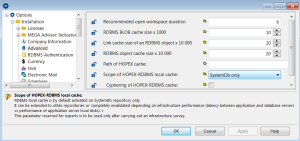
To modify the RDBMS local cache globally for all environments:
1. Start Administration.exe.
2. At the top of the tree, right-click HOPEX and select Option > Modify.
3. Expand the Installation folder.
4. Select Advanced.
5. In the right pane, for the Scope of HOPEX-RDBMS local cache option, use the drop-down list to modify the range of that cache:
o “SystemDb only” (default value).
o “Disabled”: if you do not want to use it, for example if your RDBMS instance is located on the same server as your application.
o “All repositories”: if for example you have a network latency with your RDBMS server.
By default the cache is located under the ProgramData folder:
C:\ProgramData\MEGA\HOPEX V2R1\Cache\RDBMS data\<CacheName>
<CacheName> is the identifier of the environment. It can be found in the megasite.ini file.
For example, given this section in the megasite.ini file:
[Environment Shortcuts]
466046A854876473=C:\Users\Public\Documents\HOPEX V2R1\Demonstration_RDBMS
the demonstration cache folder name will be:
C:\ProgramData\MEGA\HOPEX V2R1\Cache\RDBMS data\466046A854876473
The size of the cache varies depending on the amount of data contained in an environment. At least 500MB must be available on the disk. It can grow up to several GB for big environments/repositories.
To send this cache to a different location, modify the Path of HOPEX cache option and make sure that it is a local folder.
Architecture Model
All the architecture models described in the “Windows Front-End Architecture Overview HOPEX V2R1” document can use the RDBMS storage.
Database Server
The following sections will help your database administrator (DBA) size the Database server according to the profiles and the number of HOPEX users you plan to use.
Server disk size
Each new object takes up 30 KB on a disk (object with its attributes and links).
If you activate the HOPEX Repository Log file each action on the HOPEX repository creates an object.
It is recommended that for Oracle you initialize each new schema in a TABLESPACE that has a minimum of 5 GB available. For SQL Server, the same 5GB size should be reserved on the server disk.
Reminder:
HOPEX will stop working if the TABLESPACE is full. To avoid this, the TABLESPACE could be created with the MAXSIZE UNLIMITED option. If this is not possible, the TABLESPACE growth must be monitored carefully in order to provide more space if fullness is about to be reached.
Number of connections opened by HOPEX on the RDBMS for each HOPEX workstation
This information will help you define the amount of memory (RAM) required for the database instance used to run HOPEX on the database server
• Oracle
One connection is used for each RDBMS storage. It means that, when a HOPEX User is connected to HOPEX, two connections to Oracle are open (one for the SystemDb and one for the User repository).
An additional connection is used for each RDBMS storage when DDL instructions are issued to the RDBMS (for example when there is a first creation of an object type, in other words, when the first occurrence of a MetaClass or MetaAssociation is created).
An additional connection is used for each RDBMS storage when you use the HOPEX locks.
Each connection opened uses 1 MB of memory on the Oracle server
• SQL Server
One connection is used for each RDBMS storage. It means that, when a HOPEX User is connected to HOPEX, two connections to SQL Server are open (one for the SystemDb and one for the User repository).
An additional connection is used for each RDBMS storage when you use the HOPEX locks.
Each opened connection uses 24 KB of memory on the SQL Server.