Inside
License deployment model
Two types of references can be used:
|
Configuration
|
Example of Megasite.ini
|
Comment
|
|
Local configuration
|
[Must licence]
Path=\\server001\Apps\Licenses
|
The Must license folder (\\server001\Apps\Licenses) is configured in the file Megasite.ini of the HOPEX Installation
|
|
Shared configuration
|
[Lan]
clusterrootpath=\\mega\data
|
The file Megasite.ini of the HOPEX installation refers to the root of a shared configuration folder (ex: \\mega\data\ClusterRoot\Cfg) containing another file Megasite.ini. This file contains a direct reference to the Must license folder (\\server001\Apps\Licenses).
This type of reference must be used for Citrix/TSE deployment
|
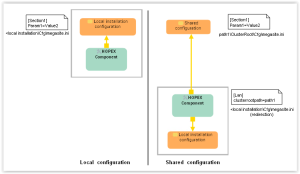
When HOPEX is run by user U0001:
1. A configuration file (megasite.ini) is read to identify the license folder.
2. The license folder can be referenced directly (local configuration) or indirectly (shared configuration).
3. The license folder is read to identify the authorized license file for this user.
4. The Must license configuration is read to identify the products authorized for this user.
5. Connection is made if tokens are available for the authorized products.
License execution
License execution is homogenous through Front-Ends or Windows Administration Console.
Windows Front-End
|
Context
|
Must license checked
|
Storage product checked (1)
|
Tokens requested
|
Command line considered
|
|
HOPEX.exe (main user)
|
Yes
|
Yes (2)
|
One token per Product
One token LAN_X
|
Yes
|
|
Administration.exe
|
Yes
|
Yes (2)
|
One token SUP
One token LAN_X
|
No
|
|
HOPEX.exe with HOPEX Power Studio (MTS2)
|
Yes
|
Yes (2)
|
One token MTS2
One token LAN_X
|
Yes
|
|
API component (3)
|
Yes
|
Yes (2)
|
One token per Product
One token LAN_X
|
Yes
|
(1) RSQ or RSO
(2) Unless GBMS storage is used.
(3) Administration component creating a running instance of HOPEX (mgwmapp.exe)
Web Front-End
|
Context
|
Must license checked
|
Counter used
|
Tokens requested
|
Command line considered
|
|
HOPEX Product (multi front-end)
|
Yes (1)
|
LAN_X
|
One token per Product
One token LAN_X
|
Yes
|
|
HOPEX Product (controlled multi front-end)
|
Yes (1)(2)
|
LAN_X
|
One token per Product
One token LAN_X
|
Yes
|
|
HOPEX Solution
|
Yes (1)
|
LAN_X
|
One token per Solution
One token LAN_X
|
Yes
|
|
SSP component
|
Yes (1)
|
-
|
No token (3)
|
No
|
|
HOPEX Explorer
|
Yes (1)
|
LAN_X
|
One token for HEXP
One token LAN_X
|
Yes
|
|
HOPEX Contributor
|
Yes
|
CBTR_X
|
One token for CBTR_X
|
Yes
|
|
HOPEX Viewer
|
Yes
|
VIEW_X
|
One token for VIEW_X
|
Yes
|
(1) RSQ or RSO product should be programmed.
(2) ANW product should be programmed.
When running the SSP component, must license is checked but no token is requested. SSP is used systematically with HOPEX Web Front-End. It can also be used by Windows Front-End.
File access
File access in the license folder should be similar to that of accessing a HOPEX repository data file. Contact MEGA Support if you encounter problems.