Presentation of SAP Solution Manager
Concepts Used in SAP Solution Manager
SAP provides a wide range of enterprise software applications and business solutions to empower all aspects of businesses. In its offering, SAP uses the concept of process blueprints which are project-based process structures to help implement and maintain its solutions such as ERP, CRM, SCM, etc. These blueprints are maintained with the SAP Solution Manager tool.
SAP Solution Manager can be used to evaluate and implement solutions. This is done through projects.
Each project has:
• a system landscape
A system landscape is composed of an arbitrary number of components which are referenced by process steps and transactions.
• a Blueprint structure
Business Blueprints are used to document the business process requirements of companies and give a general idea of how business processes could be mapped in SAP Systems.
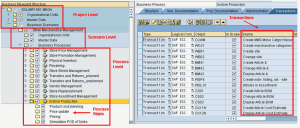
The Blueprint in Solution Manager is a hierarchical tree. At the top of the hierarchy is the Project (where project is the name of the SAP Solution Manager project). There are three levels to this hierarchy:
• Project level: Contains Master data, Organizational units, Business Scenarios
• Scenario level: Contains Organizational units, Master data, Business Processes
• Process level: Contains Process steps
Entities called transactions are commonly included in Process steps but may also be attached to Processes and Scenarios.
This is the SAP view of business processes. This hierarchy is supported and reproduced in HOPEX SAP Blueprint.
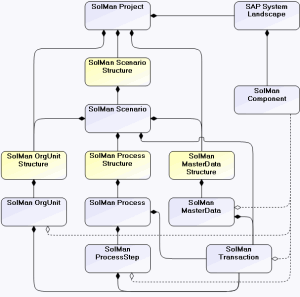
Below is a diagram illustrating the SAP Solution Manager metamodel.
SAP Solution Manager metamodel
The content of this structure is connected to the business view and maintained in sync with its equivalent in SAP Solution Manager by the MEGA/SolMan Exchange Module.
Overview of SAP Solution Manager
Let us take a quick look at how projects are presented in SAP Solution Manager.
1. Log on to SAP Solution Manager (Start > Programs > SAP Front End > SAP Logon).
2. Select a server and click Logon.
3. Enter the user name > password and press the <Enter> key.

If Solution Manager does not automatically start, run the "solar01" transaction (below the menu bar, enter solar 01 in the field left of the diskette and click the check button).
By default, the last project used by the user opens.
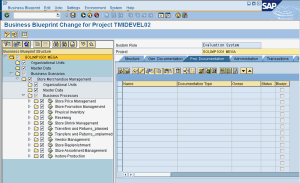
The project in this example is the Project SOLIMP1001 MEGA while the Project ID is TMIDEVEL02.
The content of the project, such as the scenarios, business processes and processes are presented in a tree hierarchy to the left of the window. The objects to be exchanged with HOPEX are in this tree. When objects exist but are not displayed in the tree, this is indicated by a clock with a green checkmark.
In exchanges, the same tree structure is displayed in HOPEX.
When you click on an object in the tree, information relating to this object is displayed in the corresponding tabs in the right frame.