Import/Export Prerequisites
Activating Variations
Before importing/exporting, it is advised to activate variations in HOPEX SAP Blueprint.

Variations are necessary to be able to view object versions and differences.
(Windows Front-End) To activate variations:
1. Log in to HOPEX and from the HOPEX desktop, select Tools > Options.
2. In the Business Process and Architecture Modeling group, select the Activate variations option.
(Web Front-End) To activate variations:
1. Log in to HOPEX and from the HOPEX desktop, select Main Menu > Settings > Options.
2. In the Business Process and Architecture Modeling group, select the Activate variations option.
Import/Export Settings
To set the import/export settings:
1. Log in to HOPEX.
2. From the HOPEX desktop select:
• (Windows Front-End) Tools > SolMan Exchange.
• (Web Front-End) Main menu > SolMan Exchange.
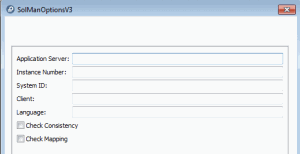
3. In the wizard that appears, click Options.
A dialog box appears.
You must complete the settings before the import/export can take place.
Some of these settings directly correspond to the settings used for connection to SAP Solution Manager with the SAP Front End:
• Application Server
• Instance Number
• System Id: number corresponding to the SAP system used
• Client: SAP client number
• Language: exchange file language
Other settings are available:
• Check Consistency: activates the consistency modeling rules for the project being exchanged.
• If selected and an invalid consistency rule is encountered when the exchange process is launched, this process is automatically aborted and no exchange takes place.
• If left unselected: the exchange takes place if the data is correct. If the data is incorrect, the exchange process fails.
• Check Mapping: activates the mapping modeling rules for the project being exchanged.
• If selected and an invalid mapping rule is encountered, the exchange process is aborted.
• If left unselected: the exchange takes place if the data is correct. If the data is incorrect, the exchange process fails.