Retrieving Objects Not Present in SAP Solution Manager
Objects that are present in HOPEX SAP Blueprint but which have been deleted from SAP Solution Manager can be found in a specific folder during the import from SAP Solution Manager into HOPEX SAP Blueprint.
if objects are deleted from a project in SAP Solution Manager and this project is then imported into HOPEX, these objects are not automatically deleted in HOPEX SAP Blueprint. They are instead marked as unfound in SAP Solution Manager. This is the case for links between the object and its project.

These links are displayed in the
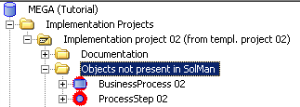
Solution Manager navigation window in the "Objects not present in SolMan" sub-folder of a project folder. All the links that existed on the object before the synchronization are kept in
HOPEX SAP Blueprint. The objects deleted in SAP Solution Manager are therefore still present and in their original place in
HOPEX after the synchronization.
Accessing objects deleted from SAP Solution Manager
To access objects deleted from SAP Solution Manager:

From a project, unfold the
Objects not found in SolMan folder.
These objects will no longer be exchanged during an export to SAP Solution Manager and will not be recreated in SAP Solution Manager either.
You can choose:
• to keep the objects not found in Solution Manager
• to delete them
Deleting the objects not found in SAP Solution Manager
To delete objects that have not been found in SAP Solution Manager:
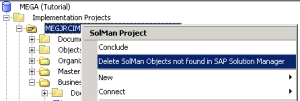
Right-click on a project, and select
Delete SolMan Objects Not Found in SAP Solution Manager.
All the objects, documentation types and statuses not found in SAP Solution Manager are deleted.