Exchanging Documents Between HOPEX SAP Blueprint and SAP
It is possible to:
• create links to the URL documentation of SolMan objects so that they can be viewed from SAP Solution Manager
• access SAP Solution Manager documents of URL type from HOPEX SAP Blueprint through external references
• categorize the documents sent by HOPEX SAP Blueprint according to SAP classification.
Creating links to the URL documentation of SolMan objects
You can create links to the URL documentation of SolMan objects allowing you to view these in HOPEX Explorer.
To activate links to the URL documentation of SolMan objects:

In the properties dialog box of SolMan projects, select the
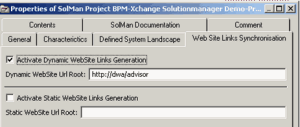
Website Link Synchronizaton tab.
The generated links are a result of mapping links in HOPEX.
Example
If in HOPEX a SolMan Scenario is mapped with an organizational process, a documentation link towards the HOPEX Advisor page of the organizational process is added in SAP Solution Manager at the next synchronization of the corresponding Scenario.
Pointing to dynamic Web sites
You can point to a dynamic Web site (HOPEX Advisor).
To specify access in SAP Solution Manager through dynamic Websites:
Select the
Dynamic WebSite Links Generation check box.
To specify the root address of dynamic websites:
Enter the URL address in the
Dynamic WebSite URL Root field.
Pointing to static Web sites
You can point to a static Web site.
To specify access in SAP Solution Manager through static Websites:
Select the
Activate Static WebSite Links Generation check box.
Accessing SAP Solution Manager Documents from HOPEX SAP Blueprint
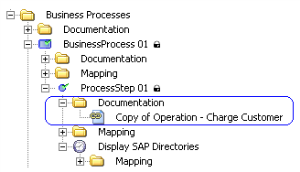
SAP documents of URL type appear in HOPEX SAP Blueprint as external references after being imported from SAP Solution Manager:
These external references appear if you have:
• created documents for SolMan objects in SAP Solution Manager
• mapped SolMan objects with HOPEX business objects
Managing MEGA document classification
In SAP Solution Manager, documents have a specific classification.
By default, MEGA documentation originating from mapping is classified under "Additional documentation". You can categorize MEGA documents so that they appear in one of the categories of the SAP Solution Manager project.
Viewing document classification
To view the documentation statuses and types available on the SolMan project:
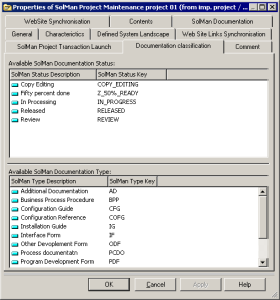
In the SolMan project properties dialog box, select the
Documentation Classification tab:

The values are those created initially in SAP Solution Manager.
Specifying document classification
You need to specify the default classification of documents on the project.
To specify the default classification of project documents:
1. In the properties dialog box of a SolMan project, select the Website Link Synchronizaton tab.
2. Specify:
• SolMan Default Document Status
• SolMan Default Document Type
You can also modify the classification on an individual document.
To modify classification of HOPEX documents on an external reference:
1. in HOPEX SAP Blueprint, from a SolMan object, unfold the Documentation folder, right-click the external reference and open its properties dialog box.
You can modify the desired values for:
• Solman Document Status
• Solman Document Type
2. Select another documentation type.
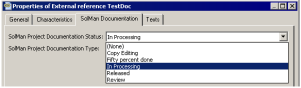
Example of values for Solman Project Documentation Status
Note the values are those created initially in SAP Solution Manager.
When data is exported, the documentation classification value is modified accordingly in SAP Solution Manager.