Adding SolMan Objects
Project requirements cannot always be met by simply selecting from the standard objects provided by SAP. Sometimes you may be required to add new objects that do not exist in SAP. HOPEX SAP Blueprint allows you to insert new objects in the project hierarchy.
However, as projects and their System Landscapes must be created in SAP Manager, the objects that can be added in HOPEX SAP Blueprint are restricted to:
• SolMan Scenarios
• SolMan Master Data
• SolMan Organizational Unit
• SolMan Process
• SolMan ProcessStep
• SAP Transaction
To insert a new object in the project hierarchy:
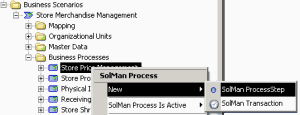
2. In the Solution Manager navigation tree, select the parent object where the new object is to be inserted.
3. Right-click this parent object and select the appropriate object type in the New menu.
A creation dialog box appears.
4. Enter the name of the new object in the dialog box and click OK.
The new object appears in the hierarchy
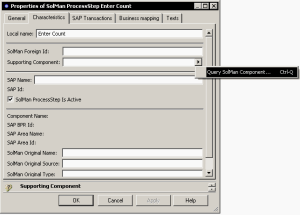
5. Right-click the new object and in the pop-up menu, select Properties to open the properties dialog box.
6. Enter the name of the Component that supports the object (Supporting Component).

You can either create a new component or find a component that already exists.
You can only add supporting components for Process Steps and Transactions.
The new object has no SAP IDs. The SAP IDS will be assigned by SAP Solution Manager during the next synchronization. Once assigned, these IDs must not be changed.
When you create new objects, you do not need to explicitly select the "Is Active" attribute. By default, the object inherits the value of the parent object.