Report Template Introduction
The Report Template describes how to build the report.

To build a
Report Template you must be in "Expert" MetaModel access (Repository options).
Once a Report Template is created, any user can use it to query HOPEX repository and create a report. Data first shown in list form can then be handled and shown in graphical format using Instant Report feature.
For details on the use of reports, see
"Generating Documentation", page 311, and more specifically
"Launching an Instant Report", page 369.
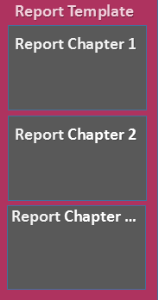
Report Template and Report Chapters
A Report Template is made up of at least one Report Chapter. The Report Template defines:
• each Report Chapter
• (if needed) report parameters.
Report Chapter and Macro or Report Data Views
The Report Chapter creation is based on either:
• a macro, or
• Reports Data View(s)
A single Report Template can include both types of Report Chapters.
Report Chapter and macro
The Report Chapter creation can be based on:
• a macro, which refers to Java code that implement dedicated interfaces
and
• if needed Report Parameters
Parameter definition indicates the input data type the user must enter for the report calculation (e.g.: Applications).
To implement a chapter with a Java macro, see Writing Java Report Chapters Technical Article.
For examples of Report Templates based on a macro see for example Report Templates > Public Report templates > MEGA folder.
Report Chapter and Report Data Views
The Report Chapter creation can be based on:
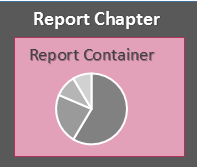
• a Report Data View.
The Report Data View is included in a Report Container.
• a set of Report Data Views.
Each single Report Data View is included in a single Report Container.
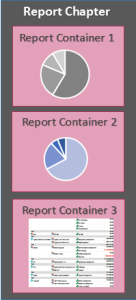
You can add a set of Report Containers in a Report Chapter.
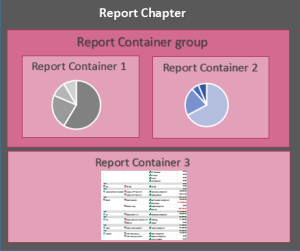
By default the Report Containers are displayed in a single column. You can modify the display of the Report Containers (e.g.: on a same row, in separate tabs) through the Report Container group.
A Report Chapter may include:
• at least one Report Container including a single Report Data View.
• several Report Containers, which can be grouped in Container Groups, so that the Report Data Views are displayed for example on the same row.
Example 1: a Report Chapter with its Report Data Views displayed in a single column.
Example 2: a Report Chapter with its first two Report Data Views displayed on the same row.
Report Data View types
The Report Data View types are:
• Table (Report Table View)
A Report Table View is built from a set of columns of a Report DataSet, which defines the set of columns of the table.
• Matrix (Report Matrix View)
A Report Matrix View is built from three columns of a Report DataSet:
• two columns to define the matrix axes,
• a third column to define the cells.
Available displays depend on the Data View type.
Report Style
You can define the style of the reports generated from a Report Template at the Report Template level with a Report Style.
You can also add a conditional style, which is defined at Report Data View element level.