 |
Do not use MegaDB, MegaRoot, and Get Root in macro scripts stored in HOPEX.
|
|
Do not use MegaDB, MegaRoot, and Get Root in macro scripts stored in HOPEX.
|
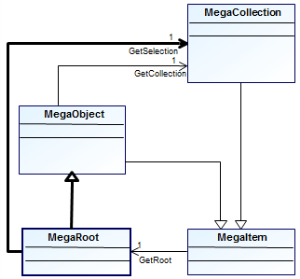
| • a session with which you are connected • either set as a parameter of the function (e.g.: Main(oRoot)) or you call a function that has as a parameter the MegaObjects. |
| To write a query in a script you want to store in HOPEX, use of MegaFields is mandatory. |
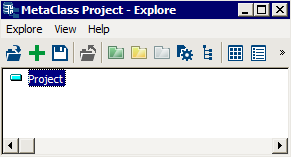
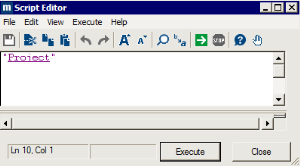
VB Script | Set oRoot = object.GetRoot oRoot.getCollection("~qekPESs3iG30[Project]").Create ("P1") |
Java | mgRoot.getCollection("~qekPESs3iG30[Project]").create("P1"); |
VB Script | Set oRoot = object.GetRoot Set oProject = oRoot.getCollection("~qekPESs3iG30[Project]").Item("P1") Set oOperations = oProject.GetCollection("~OsUiS9B5iiQ0[Operation]") For i = 1 To 10 oOperations.Create "ope-" & i Next For Each oOperation in oOperations oRoot.Print oOperation.getProp(“~Z20000000D60[Short Name]”) Next |
Java | MegaObject mgobjProject = mgRoot.getCollection("~qekPESs3iG30[Project]").get("P1"); MegaCollection mgcolOperations = mgobjProject.getCollection("~OsUiS9B5iiQ0[Operation]"); for (int j = 1; j <= 10; j++) { mgcolOperations.create("ope-" + i); } for (MegaObject mgobjOperation : mgcolOperations) { mgRoot.callFunction("~U7afnoxbAPw0[MessageBox]", mgobjOperation.getProp("~Z20000000D60[Short Name]")); } |
VB Script | Set oRoot = object.GetRoot Set oProject = oRoot.getCollection("~qekPESs3iG30[Project]").Item("P1") oProject.GetProp(“~210000000900[Name]”) = "My Project" |
Java | MegaObject mgobjProject = mgRoot.getCollection("~qekPESs3iG30[Project]").get("P1"); mgobjProject.setProp(“~210000000900[Name]”, "My Project"); |
VB Script | Set oRoot = object.GetRoot Set oAllProjects = oRoot.getCollection("~qekPESs3iG30[Project]") For Each oProject in oAllProjects sText = sText & oProject.getProp(“~Z20000000D60[Short Name]”) & vbCrLf Next MsgBox sText |
Java | MegaCollection mgcolAllProjects = mgRoot.getCollection("~qekPESs3iG30[Project]"); String strText = ""; for (MegaObject mgobjProject : mgcolAllProjects) { strText = strText + mgobjProject.getProp("~Z20000000D60[Short Name]") + "\n"; } mgRoot.callFunction("~U7afnoxbAPw0[MessageBox]", strText); |
VB Script | Set oRoot = object.GetRoot Set oOperations = oRoot.getCollection("~qekPESs3iG30[Project]").Item("My Project"). getCollection("~OsUiS9B5iiQ0[Operation]") For Each oOperation in oOperations oOperation.Importance = "P" Next |
Java | MegaCollection mgcolOperations = mgRoot.getCollection("~qekPESs3iG30[Project]").get("My Project").getCollection("~OsUiS9B5iiQ0[Operation]"); for (MegaObject mgobjOperation : mgcolOperations) { mgobjOperation.setProp("Importance", "P"); } |
VB Script | Set oRoot = object.GetRoot set myprojects = oRoot.GetSelection~YYxh7XjGIzKE[~YYxh7XjGIzKE[My projects]]("Select ~qekPESs3iG30[Project] where Not ~KsUiCCB5i0)1[Diagram] ") For each oproject in myprojects oRoot.print oproject.GetProp("~Z20000000D60[Short Name]") Next |
Java | MegaCollection mgcolAllProjects = mgRoot.getSelection("Select ~qekPESs3iG30[Project] where Not ~KsUiCCB5i0)1[Diagram]"); String strText = ""; for (MegaObject mgobjProject : mgcolAllProjects) { strText = strText + mgobjProject.getProp("~Z20000000D60[Short Name]") + "\n"; } mgRoot.callFunction("~U7afnoxbAPw0[MessageBox]", strText); |
VB Script | MyName = MyObject.Name MyName = MyObject.GetProp("~210000000900[Name]") ' equivalent to the previous line |
Java | String strMyName = mgobjMyObject.getProp("~210000000900[Name]"); |
VB Script | Set myOperations = myProject.GetCollection("~OsUiS9B5iiQ0[Operation]") For each anOperation in myOperations do .... Next |
Java | MegaCollection mgcolOperations = mgobjMyProject.getCollection("~OsUiS9B5iiQ0[Operation]"); for (MegaObject mgobjOperation : mgcolOperations) { .... } |
VB Script | numOperations = myOperations.Count For i = 1 to numOperations Set anOperation = myOperations.Item(i) Set anOperation = myOperations(i) ' same thing Next |
Java | int iNumOperations = mgcolOperations.size(); for(int j = 1; j<= iNumOperations; j++) { MegaObject mgobjOperation = mgcolOperations.get(j); } |
| Use of the "Explicit Option" option is recommended, avoiding use of global variables by explicitly declaring variables in functions (global variables do not operate in HOPEX Web Front-End context). |
VB Script | Dim Root Set Root = MyObject.GetRoot |
Java | MegaRoot mgRoot; mgRoot = mgobjMyObject.getRoot(); |
VB Script | Dim MyProjects Set oRoot = object.GetRoot Set MyProjects = oRoot.getCollection("~qekPESs3iG30[Project]") ’ contains all projects in the repository. |
Java | MegaCollection mgcolMyProjects = (MegaCollection) mgRoot1.invokePropertyGet("~qekPESs3iG30[Project]"); |
VB Script | Dim MyProjects Set MyProjects = Root.GetSelection _ ("Select ~qekPESs3iG30[Project] where Name like 'A#'") |
Java | MegaCollection mgcolMyProjects = mgRoot.getSelection("Select ~qekPESs3iG30[Project] where Name like 'A#'"); |
VB Script | Set theSource = myOperationCollection.GetSource Set theDuplicate = theSource.GetCollection _ (myOperationCollection.GetTypeID) |
Java | MegaObject mgobjSource = mgcolOperations.getSource(); MegaCollection mgcolOperationsDuplicate = mgobjSource.getCollection(mgcolOperations.getTypeID()); |
VB Script | For each anOperation In myOperationCollection ' Name is an attribute of the operation, order is a link attribute oRoot.Print anOperation.GetProp("~210000000900[Name]"), anOperation. GetProp("~410000000H00[Order]") Next |
Java | String strText = ""; for (MegaObject mgobjOperation : mgcolOperations) { // Name is an attribute of the operation, order is a link attribute strText = strText + mgobjOperation.getProp("~210000000900[Name]") + " " + mgobjOperation.getProp("~410000000H00[Order]") + "\n"; } mgRoot.callFunction("~U7afnoxbAPw0[MessageBox]", strText); |
VB Script | For Each Ope In myOperationCollection oRoot.Print Ope.GetTarget.GetProp("~210000000900[Name]"), Ope.GetRelationship. GetProp("~410000000H00[Order]") Next |
Java | String strText = ""; for (MegaObject mgobjOperation : mgcolOperations) { // Name is an attribute of the operation, order is a link attribute strText = strText + mgobjOperation.getTarget().getProp("~210000000900[Name]") + " " + mgobjOperation.getRelationship().getProp("~410000000H00[Order]") + "\n"; } mgRoot.callFunction("~U7afnoxbAPw0[MessageBox]", strText); |
VB Script | For Each Brother In _ MySlave.GetSource.GetCollection(MySlave.GetTypeID) oRoot.Print Brother.GetProp("~210000000900[Name]") Next |
Java | String strText = ""; MegaObject mgobjMySlave = mgcolOperations.get(1); for (MegaObject mgobjBrother : mgobjMySlave.getSource().getCollection(mgobjMySlave.getTypeID())) { strText = strText + mgobjBrother.getProp("~210000000900[Name]"); } mgRoot.callFunction("~U7afnoxbAPw0[MessageBox]", strText); |
VB Script | Set MyOperations = MyProj.Operation ("~410000000H00[Order]", "~ Z20000000D60[Short Name]") Set MyOperations = MyProj.Operation (1, "~ Z20000000D60[Short Name]") Set MyOperations = MyProj.Operation _ (1, "~510000000L00[Creation Date]", -1, "~410000000H00[Order]") |
Java | MegaObject mgcolMyProj = mgRoot.getCollection("~qekPESs3iG30[Project]").get(1); MegaCollection mgcolMyOps = mgcolMyProj.getCollection("Operation", "~410000000H00[Order]", "~ Z20000000D60[Short Name]"); mgcolMyOps = mgcolMyProj.getCollection("Operation", 1, "~Z20000000D60[Short Name]"); mgcolMyOps = mgcolMyProj.getCollection("Operation", 1, "~510000000L00[Creation Date]", -1, "~410000000H00[Order]"); |
VB Script | Set MyInstance = MyOperations("Type Operation", "A") Set MyOcc = MyOperations(TypeOpeID, "A") ’ identical to above, ’ if TypeOpeID contains the identifier of the characteristic |
VB Script | Set MyOcc = MyOperations(MyOtherOcc) ’ equivalent to Set MyOcc = MyOperations(MyOtherOcc.GetID) |
VB Script | MyOperations.Comment = _ "Here is the comment for my operation..." MyOperations.GetProp("~f10000000b20[Comment]") = _ "Here is the comment for my operation..." |
Java | mgobjMySlave.setProp("~f10000000b20[Comment]", "Here is the comment for my operation..."); |
| The object is no longer usable after this operation. | |||
VB Script | MyCollection.Remove MyObject | ||
Java | remove(); |
| The object is no longer usable after this operation. Be careful while using Delete on a collection, as items are shifted and the use of “for each” might not work properly. | |||
VB Script | MyObject.Delete "" | ||
Java | delete(""); |
VB Script | MyCollection.Add MyObject MyCollection.Add MyObject.GetID MyCollection.Add "Test" "Test" is the name of an existing instance. |
Java | mgcolMyCollection.add(mgcolMyObject); mgcolMyCollection.add(mgcolMyObject.getID()); mgcolMyCollection.add("Test"); |
VB Script | MyCollection.Create MyCollection.Create "Name1" MyCollection.Create "Name2", "Comment", _ "Comment of Name2" |
Java | mgcolMyCollection.create(); mgcolMyCollection.create("Name1"); mgcolMyCollection.create("Name2", "Comment", "Comment of Name2"); |
VB Script | set MyNewObj1 = MyColl.Create("Name1") set MyNewObj2 = MyColl.Add ("Test") |
Java | MegaObject mgcolMyNewObj1 = mgcolMyCollection.create("Name1"); MegaObject mgcolMyNewObj2 = mgcolMyCollection.add("Test"); |
VB Script | MyOrgProc.GetType("BPMN Process").explore runs the explorer from an object of the Organizational Process concrete MetaClass, considering it as an object of the "BPMN Owner Element" MetaClass. |
Java | mgobjMyOrgProc.getType("BPMN Process").invokeMethod("Explore"); |
VB Script | oCollection.GetType("Sequence flow").explore runs the explorer on objects of the collection belonging to the "Sequence flow" MetaClass |
Java | mgcolCollection.getType ("~jsV6VsHL7vJ0[Sequence Flow]").invokeMethod("Explore"); |
VB Script | Print myobj.GetAttribute("Operation Type") ’ Displays the attribute internal value Print myobj.GetAttribute("Operation Type").Value("Display") ’Displays the attribute value in the language used |
Java | mgRoot.callFunction("~U7afnoxbAPw0[MessageBox]", mgcolMyObj.getProp("Operation Type")); // Displays the attribute internal value mgRoot.callFunction("~U7afnoxbAPw0[MessageBox]", mgcolMyObj.getAttribute("Operation Type").getValue("Display")); // Displays the attribute value in the language used |
VB Script | Print MyOcc.GetProp("Operation Type", "External") |
Java | mgRoot.callFunction("~U7afnoxbAPw0[MessageBox]", mgobjOcc.getProp("Operation Type", "External")); |
VB Script | MyInstance.SetDefault("Display") |
Java | mgobjOcc.setDefault("Display"); |
VB Script | Root.SetDefault("Display") |
Java | mgRoot.setDefault("Display"); |
VB Script | Java |
CallFunction | public Object callFunction(Object name, Object... arg); |
CallMethod | public void callMethod(Object name, Object... arg); |
GetMethodID | public Object getMethodID(Object name); |
GetNature | public String getNature(String format); |
GetRoot | public MegaRoot getRoot(); |
GetSource | public MegaObject getSource(); |
GetTypeID | public Object getTypeID(); |
SetDefault | public void setDefault(String defaultValue); |
VB Script | Java |
AdviseRegister | public MegaAdviseToken adviseRegister(MegaAdviseTarget target); |
Add | public MegaObject add(Object objectID); |
Count | public int size(); |
Create | public MegaObject create(); |
Insert | public void insert(Object toInsert); |
Item | public MegaObject get(Object index); |
Remove | public void remove(Object toRemove); |
VB Script | Java |
Delete | public void delete(String options); |
GetClassID | public Object getClassID(); |
GetCollection | public MegaCollection getCollection(Object vcolID, Object... sortCriteria); |
GetCollectionID | public Object getCollectionID(Object name); |
GetID | public Object getID(); |
GetProp | public String getProp(Object propID); |
GetPropID | public Object getPropID(Object name); |
GetRelationship | public MegaObject getRelationship(); |
GetType | public MegaObject getType(Object name); |
GetTarget | public MegaObject getTarget(); |
Item | public Object item(); |
Remove | public void remove(); |
SetProp | public void setProp(Object propID, String value); |
VB Script | Java |
Value | Value public String getValue(); |
DefaultFormat | |
TextType | public Object getTextType(); |
DescriptionObject | public MegaObject getDescriptionObject(); |
GetAsPrivateProfile | public MegaPrivateProfile getAsPrivateProfile(); |
Translate | public MegaAttribute translate(Object language); |
SourceObject | public MegaObject getSourceObject(); |
TestValue | public String testValue(Object value, String format); |
Status | public int getStatus(); |
GetAttributeValue | public Object getValue(String format); |
VB Script | Java |
BaseCanClose | public boolean isClosed(); |
BaseClose | public void close(); |
ContextObject | public MegaCOMObject contextObject(String Name); |
CurrentEnvironment | public MegaCurrentEnvironment currentEnvironment(); |
EnterPrivilege | public Object enterPrivilege(String description); |
LeavePrivilege | public void leavePrivilege(); |
TryPrivilege | public Object tryPrivilege(String[] description); |
GetSelection | public MegaCollection getSelection(String request, Object... sortCriteria); |
GetExcecutionStatus | public int getExecutionStatus(); |
GetObjectFromID | public MegaObject getObjectFromID(Object ident); |
GetSystemRoot | |
GetClassDescription | public MegaObject getClassDescription(Object classID); |
GetCollectionDescription | |
MegaCommit | public void megaCommit(); |
MegaRollback | public void megaRollback(); |
print Print | public void print(Object value); |
SetOpenToken | public void setOpenToken(String token); |
SetUpdater |
VB Script | Java |
GetCurrentSnapshotDate GetUserOption | public Date getCurrentSnapshotDate(); myroot.currentEnvironment.getUserOption |


VB Script | The macro must implement the following functions: ‘specify the number of arguments that will be passed to the operator: here 3. Function InvokeArgCount() As Integer InvokeArgCount = 3 End Function ‘Method called when the operator is called with 3 arguments. The first argument is the object on which the call is made (megaobject). Sub InvokeOnObject(Obj as MegaObject, sFileName As String, strReportFilename as String , controlComponent As MegaObject) End Sub |
Java | The factory must define a class containing the following functions: public class MyOperator { /** * Specifies how many parameters are expected * if not defined, the method called has only one argument : the megaobject on which the call has been made */ public int InvokeArgCount() { return 3; } /** * function called with the 3 arguments. The first argument is the object on which the call is made */ public void InvokeOnObject(final MegaObject mgObjectToExport, final String strFilename, String strReportFilename, final MegaCOMObject controlComponent) { //procedure called when the operator is called } } |
VB Script | 'if you want your method to return a value, use Function InvokeOnObject(Obj As MegaObject) End Function |
Java | //return a number public int InvokeOnObject(final MegaObject mgObject) { } |
VB Script | Sub InvokeOnRoot(oroot As MegaRoot) End Function 'if you want your method to return a value, use Function InvokeOnRoot(oroot As MegaRoot) End Function |
Java | public void InvokeOnRoot(final MegaRoot mgRoot) { } Or if you want your method to return a value, use //return an integer public int InvokeOnRoot(final MegaRoot mgRoot) { } |
VB Script | Sub InvokeOnCollection(Coll As MegaCollection) End Sub 'if you want your method to return a value, use Function InvokeOnCollection(Coll As MegaCollection) End Function |
Java | public void InvokeOnCollection(final MegaCollection lst ) { } Or if you want your method to return a value, use //return an integer public int InvokeOnCollection(final MegaCollection lst ) { } |
This is to be avoided | In VB script, it can be created by the Basic function: CreateObject("MegaRepository.CurrentEnv"). To obtain the MegaApplication public object from a MegaCurrentEnv object use the MegaCurrentEnv.Site function. MegaToolkit This component groups utility functions developed for use indistinctly in internal or external mode. In this way, it does not make reference to characteristics of the session in progress. In VB script, it can be created by the CreateObject ("Mega.Toolkit") Basic function. |
This is recommended | To obtain the MegaCurrentEnv public object from a MegaRoot object use the MegaRoot.CurrentEnvironment function. |
This is recommended | The MegaToolkit public object can be obtained from the following objects: • MegaCurrentEnv, using the MegaCurrentEnv.Toolkit function, • MegaApplication using the MegaApplication.Toolkit function. |