FAQs
After a specific CP upgrade, I get the following warning: You cannot access repository "XX". Its internal structure is not up to date. Run the menu "Technical Conversion" to perform the upgrade?
With specific CP, the technical version of the repository can change. Run the conversion from the Administration Console.
For each environment:
1. Select the environment folder.
2. R click > Technical conversion.
3. Click OK when conversion of the systemdb repository is complete.
For each data repository of the environment:
1. Select the data repository.
2. R click > Technical conversion.
3. Click OK when conversion of the systemdb repository is complete.
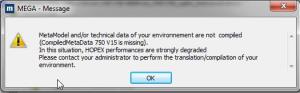
I get a message 'MetaModel and/or technical data of your environement are not compiled (XXX is missing).... Please contact your administrator to perform the translation/compilation of your environment.
This warning reports that certain elements are not compiled. The environment can be used but performances are downgraded. As requested, ask the administrator to translate and compile the environment. If possible, this should be done outside working hours since this processing can take time and will prevent all repository update while it is running.
When running the menu 'Conversions > Environment automatic update', a warning says that transactions exist.
It is not possible to upgrade the environment as long as transactions persist.
If transactions should remain, cancel environment upgrade, delete remaining transactions and resume environment upgrade.
Why are CP provided as .EXE files from HOPEX?
The .EXE format enables to install the CP in the appropriate mode (Run as administrator). Otherwise, the installation may not be fully upgraded and various problems can occur especially with HOPEX Web Front-end.
The SSP Service (mgwspp.exe) keeps re-starting and therefore loads other processes (mgwspro.exe...).
To prevent automatic load of hopex processes (mgw*.exe.) it is recommended to disable the Windows Service and stop the IIS web site. See sooner in this document, Upgrading Window Front-end, Pre-install.
What is the purpose of the menu 'Conversions > Environment automatic update > Simulate'?
This menu enables to preview the impact of the CP upgrade on project customizations. By project customizations we mean objects of the system database that are installed by HOPEX (creator = mega-user) and customized by the project (modifier <> mega-user).
To know more about this feature, consult the KB 00005120 in MEGA Community.