Using Interfaces and Interactions
A Business Interface is used to describe the communication between two Business Roles. For example the Business Interface "Claim Request Handling" is used for communication between the Insurant and the Insurer.
An Application Interface is used to describe the communication between two Application Components. For example the Application Interface "Web Claim Request Handling" is used to manage the web communication between the Insurant and the Insurer regarding the claim request over web.
An Infrastructure Interface is used to describe the communication between two Infrastructure Nodes or devices.
Introduction to Concepts
In HOPEX Archimate, a Business Collaboration or a Business Role, an Application Collaboration or an Application Component, a Device or a Node is created to assure one or several services.
These services are exposed through Provided Interfaces and used through Required Interfaces.
 A Provided Interface is a point of exchange by which an agent offers a service to potential customers.
A Required Interface is a point of exchange by which an agent requests a service from potential suppliers.
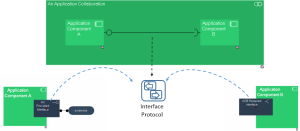
The Services usage by components through these Provided Interfaces and Required Interfaces are captured thanks to Interactions.
The Interaction uses an Interface protocol which is supported by the components Provided Interfaces and Required Interfaces.
An interaction is defined by the information exchanges by a collaboration of two or more components. It is described by an interface protocol.

Interface Procols can be further described by dedicated diagrams; this is available as part of the
HOPEX System Oriented IT Architecture Product.
Creating a Provided Interface or Required Interface
The process for creating a Provided Business Interface or Required Business Interface is identical.
To create a Provided Business Interface for a Business Role:
1. Select the Business Role and open its Actor Co-operation viewpoint diagram,
2. In the insert toolbar of the diagram, click the Provided Business Interface button.
3. Click in the diagram.
The Adding a Provided Business Interface dialog box appears.
4. Enter the Name of the new Interface and click Add.
The Creation of Provided Interface Protocol dialog box appears.
5. Click the arrow at the right of the Interface Protocol field to define the interface protocol enabling activation of this provided interface.
6. Select Create Interface Protocol.
The creation of interface protocol dialog box appears.
7. Enter the Name of the new Interface Protocol and click Ok.
8. Click OK to close this dialog box.
The Interface Protocol is automatically created.
9. Click OK.
The Provided Interface appears in the diagram.
Using Interface Protocols
An Interface Protocol is a model of a contract between entities. This contract is described by exchanges between an initiator role and a contributor role.
Access to the Interface Protocol
An Interface Protocol is supported by a Provided Interface or Required Interface which represents the information exchange channel between the components.
To access to the Interface Protocol properties:
1. Right-click the Provided Interface or Required Interface which uses the interface protocol and click Properties.
2. Click the arrow at the right of the Interface Protocol field and click Properties.
The Interface Protocol properties dialog box opens.
The Services of the Interface Protocol are presented in the
Exchange Tab.
Describing the Interface Protocol exchanges
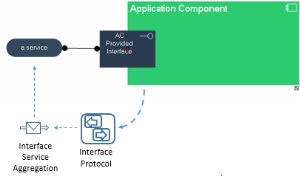
The services exposed through Provided Interfaces or used through Required Interfaces are defined thanks to Interface protocols and they are used thanks to interactions.
An
Interface Protocol breakdowns into
Services via
Interface Service Aggregation objects (automatically created when linking the service to the interface)
To specify the services exposed through a Provided Interface for exemple:
1. Create a service in the diagram.
2. In the insert toolbar of the diagram, click the Link button.
3. Click the service and holding down the mouse button, drag the cursor to the Provided Interface.
The two nodes are highlighted and a dotted line indicates the path that will be taken by the graphic link.
The link can be created from the Interface to the service.
Creating an Interaction
To create an Interaction between two Application Components, for example :
1. In the insert toolbar of the diagram, click the Link button.
2. Click the Application Component (service requirer) and holding down the mouse button, drag the cursor to the Application Component to be connected (service provider).
The two nodes are highlighted and a dotted line indicates the path that will be taken by the graphic link.
3. Release the mouse button.
The Creation of Interaction dialog box appears.
4. Click the arrow at the right of the Interface Protocol field to define the interface protocol enabling activation of this interaction.
5. Select the Interface Protocol among the possible ones or create a new one.
6. Click OK.
The interaction appears in the diagram.