 Before creating an XML schema, you must first define a namespace. See "Defining a Namespace".Before creating an XML schema, you must first define a namespace. See "Defining a Namespace".
 button in the XML schema editor toolbar.
 Diagram | Diagram |
 |  |
 button and name the class in the dialog box that appears.
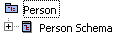
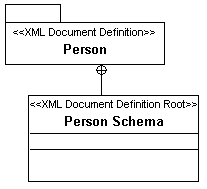
 Each XML schema is represented in HOPEX by a class of the XML Document Definition Root stereotype. When you create a new XML schema in the XML schema editor (not in the diagram), HOPEX automatically creates a class of the XML Document Definition Root stereotype to represent the schema.If the class was not created in an XML Document Definition package, the package that owns the class is automatically modified to be a package of stereotype XML Document Definition.if you create the class in the diagram and set the stereotype manually, the owner package is not modified to have the "XML Document Definition" stereotype. We therefore recommend using one of the two procedures described above.