Element declaration (XSD)
Complex types allow defining tags that can contain other tags. Certain constraints can be used to specify:
• the number of tags of a type that can be contained in it (multiplicity)
• whether the element is abstract
• a value that the tag must be assigned
• etc.
Modeling XSD elements
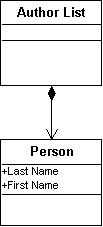
Tags contained in a tag type are inferred from the composition associations between the class representing the containing type (composition class) and the classes defining the contained tags (component classes). The declaration characteristics are supported by the association role on the side of the contained tag type.
Example
<XSD:complexType name="Listofauthors">
<XSD:element name="Person" type="Person"/>
</xsd:complexType>
From the schema editor, you can specify the following generation parameters on the role:
XSD tab:
• XSD Name: name of the tag in the context of XSD generation. If this is not specified, the name of the role is used. If the role has no name, the name of the class connected to the role is used.
• XSD Id: identifier for the element tag.
• XSD BlockExtension, XSD BlockRestriction, and XSD BlockSubstitution: used to define the values of the "block" attribute. The value of the "block" attribute is a combination of the "extension", "restriction", and "substitution" values.
• XSD FinalExtension and XSD FinalRestriction: used to define the values of the "final" attribute. This value is a combination of the "extension" and "restriction" values.
• XSD Form: value of the "form" attribute.
• XSD Value: specifies the value of the element. This parameter is used in conjuction with the "isChangeable" attribute.
• If "isChangeable" = "no", a "fixed" attribute is generated. Its value corresponds to the XSD Value parameter.
• If "Modifiable" = "yes", a "default" attribute that is assigned this value is generated.
• XSD Abstract: value of the "abstract" attribute.
• XSD Nillable: value of the "nillable" attribute.
Characteristics tab:
• Multiplicity: specifies the minimum ("minOccurs" attribute) and maximum ("maxOccurs" attribute) number of times the tag can appear in the containing tag.
• Editable: when this attribute is "no", a "fixed" attribute appears in the element tag (if a value is given to the XSD Value parameter).
Keys
Keys implement the concepts of uniqueness (primary key) and of referencing an element.
In an XSD document, keys are used to specify that the elements of a tag (such as an attribute) must have the same value as the elements of another tag in the document instance.
Keys are formally defined in
MEGA by "Constraints" connected to the class role. The name of the generated key is copied onto that of the constraint. The content of the generated <key> tag is identical to the text contained in the "XSD constraint" attribute of the constraint. This text contains the definition of the key, and must conform with XSD specifications (use of the <selector> and <field> tags). See
“XSD: Constraints", page 55.
There are also keys that result in tag generation:
<unique>
This tag is generated from a constraint of the "XSD uniqueness" stereotype. This constraint indicates that there cannot be two tags (containing the key) in which the key elements have the same value. See
“Uniqueness in XSD", page 55.
<key>
This key has the same properties as <unique>. In addition, it can be used as a reference for a <keyref> key. The constraint representing this key has the "XSD Key" stereotype. See
“Primary Key and Foreign Key in XSD", page 56.
<keyref>
Referencing XSD Elements
It is possible to define an element in the schema. This element can then be referenced within a tag definition. The purpose is to avoid redundant definitions. See
"Referencing an Element (XML Schema)".
Substitution (XSD)
It is possible to declare than an element (called the head element) can be substituted for another in the document instance. This is a "substitution group". The substituted element must be declared globally.
To create the substitution:
1. In the class diagram, create an element of the same type as the head element, or a derived type.
2. Connect the role of the substituting element to the element being replaced. This is an "Overloaded role" link.
3. Open the Properties dialog box for the link.
4. Click the Generation tab, then the XSD sub-tab.
5. In the IsSubstituableTo box, select "yes".
Overloading in an Inheritance by Restriction (XSD)
When a type is derived by restriction, you can redefine the elements contained in the basic type. For example, you can reduce the multiplicity.
To overload an element:
1. In the class diagram, create a composition between the derived type and the type of the overloaded element.
2. Connect the role representing the overloading element to the one being overloaded. This is an "Overloaded role" link.
3. Open the Properties dialog box for the link.
4. Click the Generation tab, then the XSD sub-tab.
5. In the IsSubstituableTo box, select "no".
In all cases, the element generated in the derived type will have the same name as the one overloaded.
Associative Classes (XSD)
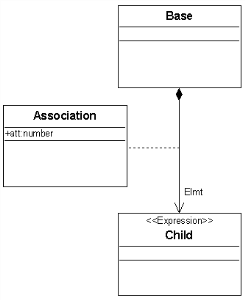
Associative classes are only taken into account in compositions. They are used to create elements whose type is an extension of that of the component class. This extended type is only valid in the context of this relation.
In the generated schema, this means creating an element whose type is derived from the component class (as if there existed a generalization between the component class and the associative class).
Example
<xsd:complexType name="Base" mixed="false">
<xsd:sequence>
<xsd:element name="Elmt" type="Association" minOccurs="0" maxOccurs="unbounded">
</xsd:element>
</xsd:sequence>
</xsd:complexType>
<xsd:simpleType name="Child">
<xsd:restriction base="xsd:NMTOKENS">
</xsd:restriction>
</xsd:simpleType>
<xsd:complexType name="Association" abstract="false" mixed="false">
<xsd:simpleContent>
<xsd:extension base="Child">
<xsd:attribute name="att" type="d:number" use="required">
</xsd:attribute>
</xsd:extension>
</xsd:simpleContent>
</xsd:complexType>