Association Classes
Association classes represent an association and specify its characteristics.
To create an association class:
1. Open a class diagram, and drag the two associated classes into the diagram.
2. Create a new class.
3. Using the Link button, create a link between the class and the association.
4. The association class is linked to the association by a dotted line.
The attributes of association classes are used when building a schema : they correspond to the attributes of the association that are only useful in the context of the element.
When generating schemas, the attributes of association classes migrate to the tag that the associated class defines.
Example
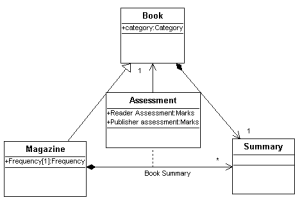
The "Book" class defines a tag containing a sub-element called "Summary".
The tags based on the "Magazine" class also have the summary because the defining class inherits "Book".
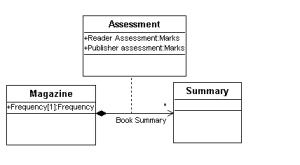
However, magazines may contain book summaries (in a book review for example).
In this context, book summaries based on the "Summary" class have the following additional attributes: "Reader Assessment", "Publisher Assessment". These additional attributes are modeled by the "Assessment" association class.
The schemas below show the difference between the "Summary" tag generated for books and the "Book Summary" tag generated for magazines.
XSD
<xsd:ComplexType name="Summary">
<xsd:attribute name="id" type="xsd:ID"/>
</xsd:ComplexType>
<xsd:ComplexType name="BookSummary">
<xsd:attribute name="id" type="xsd:id"/>
<xsd:attribute name="Book" type="xsd:idref" use="required"/>
<xsd:attribute name="ReaderAssessment" use="required">
<xsd:enumeration value='VeryGood'/>
<xsd:enumeration value='Good'/>
<xsd:enumeration value='Average'/>
<xsd:enumeration value='NotVeryGood'/>
<xsd:enumeration value='Bad'/>
</xsd:attribute>
<xsd:attribute name="PublisherAssessment" use="required">
<xsd:enumeration value='VeryGood'/>
<xsd:enumeration value='Good'/>
<xsd:enumeration value='Average'/>
<xsd:enumeration value='NotVeryGood'/>
<xsd:enumeration value='Bad'/>
</xsd:attribute>
</xsd:ComplexType>
Result
Diagram | Diagram | XML Document |
| | <Magazine category="Literature" Frequency ="Weekly" BibliographicReference="125" ISBN="1" Author="Jack" <TitleSummary ReaderAssessment = "Good" PublisherAssessment = "Average"</TitleSummary></Magazine> |
To view the association class in the XML schema editor:

click on the
Display types 
button and open the association for which the association class is defined.