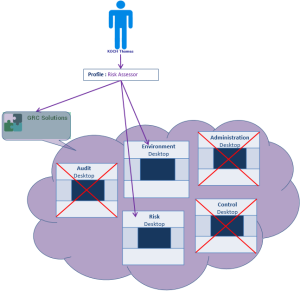
Connection schema: Person - Profile - Application - Specific Desktops
A user can connect to applications via customized desktops according to actions to be performed.
If an application contains several desktops, you can specifically define application desktops that are accessible to the concerned profile. To do this, you must connect to the profile:
• the application containing the desktops.
• the desktops to which you want users of the profile to connect.
The application desktops that are not connected to the profile are not accessible to users of the profile.
Example:
The Risk Assessor profile is connected:
- to the GRC Solutions application which contains in particular the "Audit", "Environment" and "Administration" desktops.
- to the "Risk" and "Environment" desktops of the "GRC Solutions" application.
User Thomas KOCH with the Risk Assessor profile can connect only to the "Risk" and "Environment" desktops of the GRC Solutions application. The "Audit", "Control" and "Administration" desktops are not authorized.
 To modify a profile delivered by MEGA, you must have rights to modify HOPEX data. Alternatively, you can create a new profile, see "Customizing an Existing Profile / Creating a Profile from an Existing Profile".