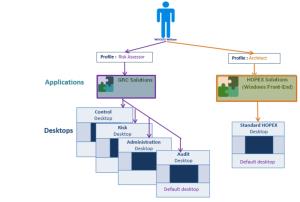
Connection schema: Person - Profile - Application - Desktops
So that a user of a profile can connect to an application, you must connect this application to the profile concerned.
All desktops connected to the application are then accessible.
Example:
The GRC Solutions application is linked to the Risk Assessor profile and the HOPEX Solutions (Windows Front-End) application is linked to the Architect profile.
No desktops of the GRC Solutions or HOPEX Solutions (Windows Front-End) application are directly linked to the Risk Assessor and Architect profiles.
The user William WOODS, who has the Risk Assessor and Architect profiles, has access to all the GRC Solutions and HOPEX Solutions (Windows Front-End) applications.
 To modify a profile supplied by MEGA, MEGA recommends you create a new profile; see "Customizing an Existing Profile / Creating a Profile from an Existing Profile".