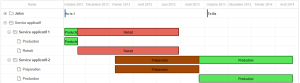
Synchronizing Master Plans
Master plans are scenarios, in which time-dependent objects are planned according to their milestones. When the different master plans have been created, they must be synchronized so as to:
• Understand how they are coordinated,
• Determine possible conflicts between sub-master plans and the global plan, and between sub-master plans themselves.
A master plan type is available for this purpose: Master plans aggregation. It enables a check on cumulative results of several master plans
Synchronization example
Imagine a master plan that describes implementation of applications responding to business requirements.
These applications depend on a certain number of IT services.
Installation of these IT services is represented by another master plan.
Though intervening at two distinct levels, an application view on the one hand, and a more technical view on the other, the two master plans are complementary - the applications cannot be installed if IT services are not available.
Synchronization will indicate if the applications implementation plan corresponds with the standards evolution scenario. This assumes that applications are connected to IT services.
Master Plan Aggregation
A master plan aggregation merges sub-master plans using milestone dates.
Milestones displayed in the higher level plan are those of one or of all selected sub-master plans.
These milestones are included automatically when you select the "Milestone Inclusion" option on each sub-master plan.
To create a master plans aggregation:
1. Right-click the master plan folder and click New > Master Plan.
2. In the wizard that appears, select Master Plans Aggregation.
3. Click Next.
4. Connect the master plans to be synchronized, for example: the applications evolution plan and the IT services evolution plan.
5. Click Finish.