Implementing a Master Plan in a Project
When the master plan has been selected, it should be implemented via one or several projects.

A project is a part of a system whose study is entrusted to the same team.
A project contains a set of tasks to be completed to achieve a specific objective. Definition of these tasks is one of the elements differentiating the project from the master plan. The project does not specify how elements are implemented. Similarly, structures responsible for this implementation are specified only within the framework of a project.
Finally, the project will enable definition of deliverables produced, used or updated. In that a project contributes to master plan implementation, we expect that a proportion of the deliverables supplied or updated corresponds to those specified in the master plan. An analysis report can be used to view the extent of this contribution.
HOPEX Planning enables creation of a project and its association with a master plan to specify the contribution of the project to the master plan.
In addition, HOPEX Planning provides a report template that gives a view of the contribution of a project to a master plan.
Creating a project from a master plan
To create a project:
1. In the properties dialog box of the master plan, select the Implementation tab.
2. Click the New button.
The Create Project dialog box appears.
3. Enter the Name of the project.
4. Click Finish.
The project is created and added to the list of projects in the menu tree.

In the project creation wizard, you can choose to base your project on a project type and on a method. To do this, select
Next instead of
Finish For more details on the project creation wizard, see chapter "Project Creation Assistance" of the HOPEX Common Features guide .
Attaching deliverables to the project
We expect a project contributing to master plan implementation to produce deliverables in the state declared in the master plan. A project will not necessarily cover all expectations of a master plan, but at minimum it will handle certain of its elements. In this case, several projects are required to successfully accomplish the expected evolution.
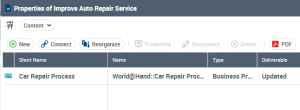
To specify the deliverables provided by a project, you must attach these to the project in the Content tab of the project properties dialog box. You can specify if a deliverable is produced, used or modified.
project properties (Web Front-End)