Entering Object Comments
Comments provide more information on the flowchart when such useful details do not appear in the drawing. These comments are generated in the document associated with the diagram.
You should enter a comment for each object in the diagram.
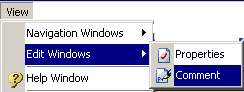
To avoid having to open and close the properties dialog box for each object in the diagram, select View > Edit Windows > Comment.
The Comment dialog box appears at the bottom of the screen.
It shows the comment of an object when it is selected.
Each time you click on an object in your diagram, the Comment window displays the comment for the object. You can also modify the comment in this window.

You can also enter a comment from the
Texts tab of the object properties dialog box. In the dialog box that opens, select
Comment in the drop-down list and enter your comment.