Functional Modeling Example
The system processes used for a project functional analysis are stored in a package.
In the example of the purchase request processing automation project, system processes are stored in the "Urgent Purchase Requests" package .

A system process is the executable representation of a process. the events of the workflow, the tasks to be carried out during the processing, the algorithmic elements used to specify the way in which the tasks follow each other, the information flows exchanged with the participants.
Access the system process diagram from a package
To access the system process diagram from a package:
1. In the Home navigation window, expand the tree associated with the package, for example the "Urgent Purchase Requests" package.
The list of system processes stored in the package appears.
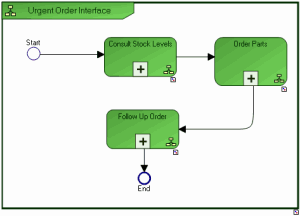
2. Right-click the system process, for example "Urgent Order Interface" to open its pop-up menu, and select System Process Diagram.
The diagram opens.
The main steps of this system process are:
consult local stock levels so that a spare part can be made available
order parts when stock level has reached critical threshold or if a part is unreferenced
follow-up an order
Display the diagram describing a step in the system process in detail:
To open the diagram describing a step in the system process in detail:
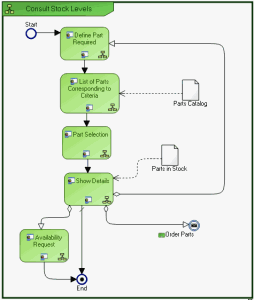
1. Right-click the system process, for example "Consult Stock Levels" to open its pop-up menu.
2. Select System Process Diagram.
The diagram associated with the process opens.
Consulting stock levels begins by display of a screen enabling identification of the required part. The list of parts found in the catalog is presented in the next screen.
When the user has selected the required part, information on details is displayed. From this screen, it is possible to obtain information on another part, make an availability request for the part, or indeed order the part.