Describing IT Service Implementation
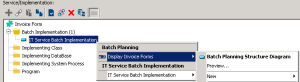
To describe that an application service is implemented by a batch plan, for example:
1. Open the properties window of the application service in question.
2. Select the Implementation tab.
3. In the Service/Implementation section, right-click on the Implementation per Batch Process folder and select New.
The window for creating an application service implemented by a batch process appears.
4. Click the arrow at the right of the Implementing Batch Process box and select Connect in the drop-down list.
A connection dialog box opens.
5. Select Batch Planning in the left part of the window and click the search arrow.
The list of batch plans appears.
6. Select the report that interests you and click Connect.
7. Click OK.
The application service implemented by a batch process appears in the list. It is connected to the batch plan selected.