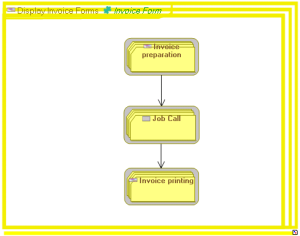
Building a batch planning structure diagram

A batch planning defines all the IT processing operations to be executed on one or several machines over a given time period.
Creating a batch planning structure diagram
The sequencing of automated processes can be described in a batch planning structure diagram.
To create a batch planning structure diagram:
1. Right-click the batch plan and select New > Diagram.
The diagram creation dialog box opens.
2. Creating Batch Planning Structure Diagram. Check that you have selected the Initialize the diagram option before clicking Create.
The diagram opens.
Adding a call for batch processing in the diagram
The components of a batch plan are defined with batch processing calls that are positioned in the diagram. This can be applied to batch plans or programs.
To add an operating type component to the string structure diagram for batch process:
1. Select the Batch Processing Call button and click in the diagram.
The Add a Batch Processing Call dialog box opens.
2. Click the arrow at the right of the Batch Process Called box and select Connect in the drop-down list.
A connection dialog box opens.
3. Select Batch Planning in the left part of the window and click the search arrow.
The list of batch plans appears.
4. Select the report that interests you and click Connect.
5. Click OK.
The call for batch processing appears in the diagram with the batch planning icon.
Defining batch sequencing
To specify the execution order of processes:
1. Click Batch Sequence.
2. Click the initial batch processing call and, holding the left mouse button down, draw a link to the batch processing call.
3. Release the mouse button.
The link representing the sequencing of the processes appears in the diagram.