System Blueprint - 4 System Design
This report template enables description of the internal structure of a project application, the IT services and the databases of this application.
The description of services concerns services "produced" or "updated" in the project (see
"State of deliverables"). These are services that belong to the internal architecture of the analyzed application, and that are linked to the application by the “defined-service” link.
Each report relates to a specific application. Using this report template you can generate as many reports as there are applications.
A "System Blueprint - System Design" report template presents:
• the application tree of the described application.
• internal architecture diagrams of the application.
• data models describing databases of the application.
• system processes of services.
• interaction scenario diagrams and sequence diagrams of use cases implementing services of the application (see below "Specifying services implemented in a use case").
• matrix of requirement traceability.
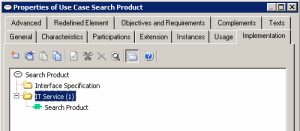
Specifying services implemented in a use case
To define services implemented in a use case:
1. Open the properties dialog box of the use case.
2. Select the Implementation tab.
3. Select the IT Service folder and click the New or Connect button, depending on whether it is a new or existing service.