HOPEX System Blueprint : HOPEX System Blueprint : Analyzing Project Data : HOPEX System Blueprint Reports : Predefined Report Template Operation
   
Predefined Report Template Operation
Two main factors are necessary for correct use of HOPEX System Blueprint analysis reports: project scope and project deliverables state.
Project scope
Objects displayed in HOPEX System Blueprint analysis reports are objects within the scope of the project, in other words contained in the project packages. These packages group the different project elements: requirements, actors, use cases, etc. They can be created automatically at initialization of a project (see “Initializing the project HOPEX System Blueprint", page 27).
Each package generated automatically is stereotyped according to the objects it contains:
 
Package default name
Package object type
Package stereotype
Project name - Actors
Org-Units
Actors profiles group
Project name - Use cases
Use case
Use case group
Project name - Persistent data
Data models
Data model group
Project name - System dynamics
System process
System process group
Project name - Requirements
Requirement
Requirement group
Project name - User interfaces
MMI
User interface group
You can then create new packages from the project, attaching these to one of the required stereotypes.
*A stereotype is a type of modeling element that extends the semantics of the metamodel. Stereotypes must be based on existing types or classes whose structure they use. Other stereotypes can be created by the user.
To define the stereotype of a package:
1. Open the properties dialog box of the package.
2. Click the Characteristics tab.
3. In the Stereotype box, select the required stereotype.
State of deliverables
Certain reports require definition of the state of deliverables contained in the project, corresponding to the state of progress of your IT project.
A deliverable is information on an element contained in the IT project, which can be: "produced", "updated" or "used".
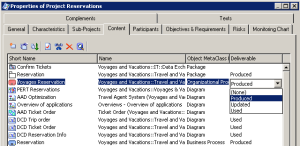
To indicate if an element is produced, updated or used in the project:
1. Open the project properties dialog box.
2. Select the Content tab.
3. Select the element name.
4. In the Deliverable column, select one of the options.