Initializing the project HOPEX System Blueprint
To clearly organize information relating to an IT infrastructure evolution project, HOPEX System Blueprint relies on package mechanisms.

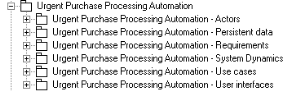
A package partitions the domain studied and the associated work. It enables grouping of various elements, in particular use cases and classes. A package can also contain other packages. Packages are interconnected through contractual reports defining their interface.
The package associated with the project allows you to store referenced elements in sub-packages such as one for UML actors and another for use cases.
These packages determine project scope; at generation of deliverables on a project, only the elements contained in these packages are analyzed.
To simplify use of packages, HOPEX System Blueprint enables automatic creation of all packages recommended for projects.
To initialize your project:
1. Right-click the project and select Initialize System Blueprint Project.
2. Expand the project folder, then the Content folder to view the package folder that carries the project name, and the sub-packages created by default.