Triggering Workflow Transitions
HOPEX solutions are based largely on workflows to manage interactions between different stakeholders.
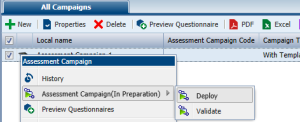
To trigger a workflow transition on an object:
1. Select the object in question (in a list of objects for example).
2. Right-click the icon of the object and select the appropriate workflow command.
The workflow then progresses. The object passes to another workflow state and a new participant can intervene in the workflow.
 For more details on workflow definitions, see "Using Workflows".