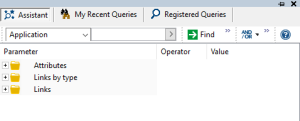
Presentation of the Advanced Search Tool
The advanced search tool (Query Tool) is available:
• from the workspace, using the

of the search toolbar.
• from other HOPEX tools such as diagrams, the explorer, etc.
Different modes, each corresponding to a tab, are available depending on how the search is run (from the workspace or from another tool).
Use the advanced search tool to enter queries, which define:
• the objects and links browsed.
• the conditions on links and objects making up the repository browsing path.
The subject of the search is called “target”.
A query can be written:
• directly using the repository query language (ERQL)

ERQL (Entity Relationship Query Language) enables you to define queries using entity/relationship formalism.
For information on this language syntax, see "Query Syntax".
Querying from the workspace
In your HOPEX (Windows Front-End) workspace, you can search objects via:
• the search toolbar to run a quick search
• the advanced search tool (click
) which offers a number of search modes:
• Assistant
• Recent queries
• Registered queries
Searching from another HOPEX tool
The search tool can be called from numerous HOPEX windows or tools (explorer, diagram, etc.).
For example it can be called from a diagram if you want to add an object.
When run from another HOPEX tool, the search toolbar includes the following tabs in addition to the three standard modes: