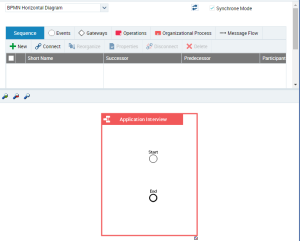
Opening a diagram in tabular input mode
Tabular input mode is offered for certain diagram types only.
To open a diagram in tabular mode:
1. In the navigation window, right-click the object concerned to display its pop-up menu.

If a diagram already exists for the object selected, its name appears in the pop-up menu of the object.
2. Click the diagram you want to open.
The UI of the table input mode opens in the edit area. The table already contains the elements contained in the diagram. The view of the elements in the table and the diagram can vary according to the rights attached to the user profile.
For more details on updating a diagram with the editor, see
HOPEX Common Features, "Previewing Diagrams".
The tabular input page is divided into two sections:
• one section contains the input table for the diagram data,
• the other section contains a preview of the diagram.