Creating a System Process Diagram
Windows Front-End
To create a system process diagram:
1. Right-click the business process name and select New Diagram.
2. Select the "System Process Diagram" diagram type.
3. Keep the option Diagram initialization selected (by default) to initialize the diagram. Diagram initialization automatically positions the frame of the described process and the main events.
4. Click Create.
Web Front-End
To create a system process diagram:
 Right-click the process name and select System Process Diagram
.
The system process algorithm can be expressed by sequencing of tasks and decisions.
Example
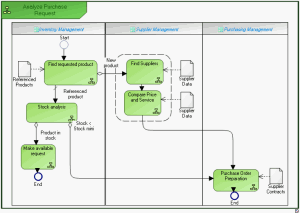
The diagram below represents purchase request processing.
• A product search is carried out from the referenced products repository.
• If the product is new, search for a supplier and comparative study of prices is carried out. An order is then sent and the process ends.
• If the product is referenced, stock is analyzed.
• If stock is sufficient, a "Make available" request is activated and the process ends.
• If stock is less than minimum stock, an order is sent to the supplier and the process ends.
See also: