Using business capability maps

A business capability map is a set of business capabilities with their dependencies that, together, define a framework for an enterprise stage.
With HOPEX Business Architecture, the assessment of business capabilities deals with the following characteristics:
• the business value,
• capability effectiveness,
• capability efficiency,
• financial impact.
The assessment of business capability map is accessible using transformation stages to which the map is connected. This assessment is therefore valid in the context of the enterprise stage and at a given date.
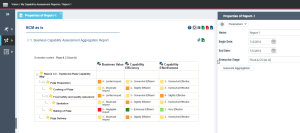
The results of the business capability map assessment are displayed in dedicated reports which make it easier to analyze the results.
Creating an evaluation of business capability maps
You can create new assessment with a view to assessing each business capability connected to the business capability map from a transformation stage, an enterprise stage or an enterprise plan.
To create an assessment:
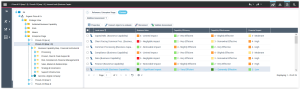
1. Open the enterprise stage property page that interests you.
2. Select the Capabilities Assessment page.
3. Click Connect objects to evaluate.
A selection window presents the business capability map connected to the enterprise stage.
4. Select the business capability that you want to assess and click OK.
The selected capabilities appear in the property page.
5. For each business capability, fill in the columns corresponding to the assessment characteristics.
• the business value,
• capability effectiveness,
• capability efficiency,
• financial impact.
6. Click the Validate Assessment button.
A validation window opens.
7. Specify the assessment date and click OK.
Consult the capability map assessment results
A report provides access to the assessment results of the business capabilities conected to the enterprise stage.
See
 The enterprise stage must be linked to a business capability map. For more details, see "Describing Business Capabilities".