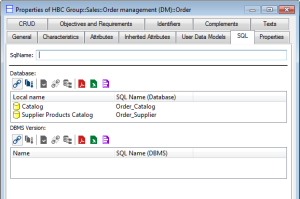
Entity SQL Options
SQL options available in an entity properties dialog box concern synchronization, which enables translation of a data model expressed in entity/association formalism to a logical model expressed in relational formalism. See
“Synchronizing logical and physical models", page 73.
At synchronization, an entity produces a table. On the entity you can define the name of the table that will be produced.
To indicate the SQL name of the table:
1. Open the properties dialog box of the entity.
2. Select the SQL tab.
When an entity is connected to several databases, you can assign to the table a name differing from one database to another.
You can also define a default name as a function of the target DBMS.
When fields SQL Name (Database) and SQL Name (DBMS) indicate different names, the name defined at database level takes precedence at synchronization.