Defining an Entity Identifier
Each object has an identity that characterizes its existence. The identifier provides an unambiguous way to distinguish any object in an entity. It is one way to distinguish between two objects with identical attribute values.

An identifier consists of one or several mandatory attributes or roles that enable unique identification of an entity.
Example
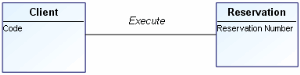
Customer number 2718 executes Reservation number 314159.
Each entity has a unique identifier whose value can be used to find each of its instances.
By default, the identifier is implicit. At synchronization, a primary key will be automatically generated from the entity name.
Implicit identifier
On the implicit identifier it is possible to define length, decimal and datatype.

The datatype of an implicit identifier cannot be composite (example: datatype in form of address).
You can define identifier properties:
• In the identifier properties dialog box, SQL tab.
• In the database editor.
To define identifier properties from the database editor:
1. Right-click the database concerned.
2. Select Edit.
3. In the editor conceptual view, expand the entity that contains the identifier then select the identifier.
Its characteristics appear in the left pane of the editor. You can modify the values shown by clicking the corresponding box.
For more information on the database editor, see
“The Database Editor", page 116.
Configuring PK column names at synchronization
At synchronization in conceptual > logical mode, the entity identifier becomes the primary key of the table. If the identifier is implicit, a column is automatically created. It is possible to configure the PK column name construction rule. See “Configuring PK column names (implicit identifier)", page 109.
Identification by an attribute
It is also possible to select one of the attributes of the entity as its identifier.
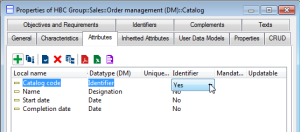
To do this, in the Attributes tab of the entity properties dialog box, select value "Yes" for the Identifier characteristic of the selected attribute.
A candidate key comprising this attribute is then automatically created for this entity. After synchronization to the logical model, the corresponding primary key will be created in the table generated for the entity.
Relative identification
In certain cases, it is useful to identify an entity relative to another entity.
In the above example, an order line is identified relative to the order it is from. Its identification could consist of the order number followed by its order line number (example: 3rd line in order A721).
To identify an entity relative to another entity:
1. Open the properties dialog box of the entity to be identified, for example "Order line".
2. Select the Identifiers tab.
3. Select the identifier and click the
Add elements 
button.
A window lists elements to which additions can be made.
4. In our example, select the "Command" role and click OK.
Composite identifier
You can define an identifier by:
• attributes
• roles with a multiplicity of 1
• generalizations
When a role is added to the entity identifier, a foreign key and its columns are generated in the corresponding table at synchronization.
By default, associations do not have their own identifiers: an association is identified by the identifiers of the linked entities.
An identifier can comprise one or several elements.
To define identifier composition:
1. Open the properties dialog box of the entity.
2. Select the Identifiers tab.
3. Select the identifier and click the Add elements button.
A list of available elements appears.
4. Select an element and click OK.
The elements that comprise an identifier are displayed in the form of a list. You can specify the order of these elements by clicking the
Order button

in the
Identifiers tab.
Other buttons allow you to:
•  Delete
 an element
• 
Access
Properties of an element