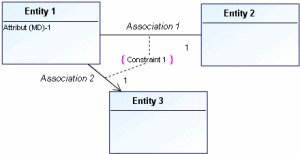
Constraints

A constraint is a declaration that establishes a restriction or business rule that must be applied on execution of processing.
Most constraints involve associations between entities.
Examples of constraints:
The person in charge of a department must belong to the department.
Any invoiced order must already have been delivered.
The delivery date must be later than the order date.
A sensor covering a zone can trigger an alarm for that zone only.

The aim of constraints specification is to enhance the model, but it is not taken into account by synchronization and table generation with
MEGA Database Builder.
To create a constraint:
1. Click the
Constraint 
button in the diagram objects toolbar.
2. Click one of the associations concerned by the constraint, for example “Association 1”, then drag the mouse to the second association, for example “Association 2” before releasing the mouse button.
The Add constraint dialog box opens.
3. Enter the name of the constraint, "Constraint 1”, then click Create.
The constraint now appears in the diagram.

Save your work regularly using the button