Associations

An association is a relationship that exists between two or more entities. It can carry attributes that characterize the association between these entities
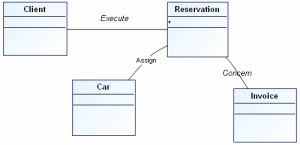
Examples of associations
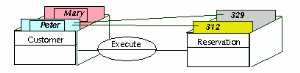
Associations can be compared to links between index cards.
The following drawing provides a three-dimensional view of the situations a data diagram can store.
Peter and Mary are clients. Peter has made reservations numbers 312 and 329.
A data diagram should be able to store all situations in the context of the company, but these situations only.

The diagram should not allow representing unrealistic or aberrant situations.
Examples of associations:
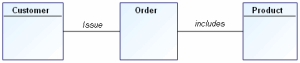
• A client issues an order.
• An order includes several products.
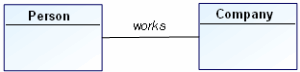
• A person works for a company.
• An alarm is triggered by a sensor.
• A sensor covers a zone.
• A window displays a string of characters.
Creating an Association
To create an association:
1. In the data diagram objects toolbar, click the
Association 
button.
2. Click one of the entities concerned, and holding the mouse button down, drag the mouse to the other entity, before releasing the button.
A line appears in the diagram to indicate the association.
3. To indicate the association name, open its properties dialog box from its pop-up menu.
You can enter its name in the Local Name field of the Characteristics tab.
Defining association roles (ends)
A role enables indication of one of the entities concerned by the association. Indication of roles is particularly important in the case of an association between an entity and itself.
Each end of an association specifies the role played by the entity in the association.
The role name is distinguished from the association name in the drawing by its position at the link end. In addition, the role name appears in a normal font, while the association name is italicized.

The status bar (located at the bottom of the window) also allows identification of the different zones: when you move your mouse along the association, it indicates if you are on an association or on a role.
When two entities are linked by only one association, the names of the entities are often sufficient to describe the role. Role names are useful when several associations link the same two entities.
Multiplicities
Each role in an association has an indicated multiplicity to specify how many objects in the entity can be linked to an object in the other entity. Multiplicity is information related to the role and is specified as a completely bounded expression. This is indicated in particular for each role that entities play in an association.
Multiplicity specifies the minimum and maximum number of instances of an entity that can be linked by the association to each instance of the other entity.
The usual multiplicities are "1", "0..1", "*" or "0..*", "1..*", and "M..N" where "M" and "N" are integers:
• The “1” multiplicity indicates that each object of the entity is linked by this association once and once only.
• The “0..1” multiplicity indicates that at most one instance of the entity can be linked by this association.
• The “*” or “0..*” multiplicity indicates that any number of instances of the entity can be linked by the association.
• The “1..*” multiplicity indicates that at least one instance of the entity is linked by the association.
• The “M..N” multiplicity indicates that at least M instances and at most N instances of the entity are linked by the association.
1 | One and one only |
0 / 1 | Zero or one |
M..N | From M to N (natural integer) |
* | From zero to several |
0..* | From zero to several |
1..* | From one to several |
Example:
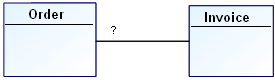
0 / 1 | An order corresponds to zero or at most one invoice. |
* | No restriction is placed on the number of invoices corresponding to an order. |
1 | Each order has one and only one corresponding invoice. |
1..* | Each order has one or more corresponding invoices. |
Other examples of multiplicity:
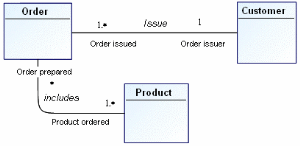
1..* | A client can issue one or more orders. |
1 | An order is issued by one and only one client. |
1..* | An order contains one or more products. |
* | A product can be contained in any number of orders, including no orders. |
0 / 1 | A person works for a company. |
1..* | An alarm is triggered by one or more sensors. |
1 | A sensor covers one and only one zone. |
1..* | A window displays one or more strings. |
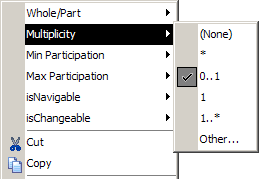
To specify role multiplicity:

Open the pop-up menu for the role by right-clicking the line between the association and the entity, then select
Multiplicity.
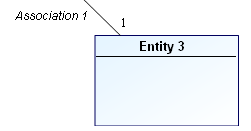
The multiplicity now appears on the role.
If the menu you see does not propose multiplicity, check that you clicked on that part of the line indicating the role and not the association.
All the information specified with the pop-up menu can also be viewed and modified in the role properties dialog box.
Aggregation
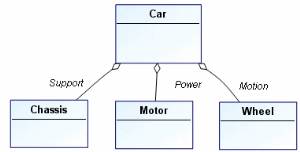
Aggregation is a special form of association, indicating that one of the entities contains the other.
Example of aggregation:
A car includes a chassis, an engine, and wheels.
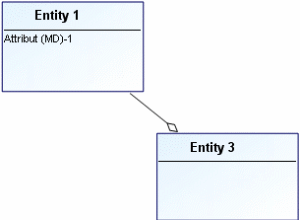
Select
Whole/Part > Aggregate on the role played by "Entity 3" in its association with "Entity 1".
A diamond now appears on the role, representing the aggregation.
Composition
A composition is a strong aggregation where the lifetime of the components coincides with that of the composite. A composition is a fixed aggregation with a multiplicity of 1.
Example of composition:
An order consists of several order lines that will no longer exist if the order is deleted.
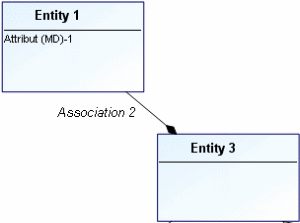
Composition is indicated by a black diamond.
To specify the composition of a role, select
Whole/Part > Composite from its pop-up menu.
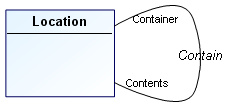
Using reflexive associations
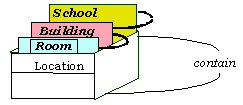
Certain associations use the same entity several times.
A classroom, a building, and a school are all locations.
A classroom is contained in a building, which is contained in a school.
A reflexive association concerns the same entity at each end.
To create a reflexive association:
1. Click the
Association button
in the objects toolbar.
2. Select the entity concerned and drag the mouse outside the entity, then return inside it and release the mouse button.
The reflexive association appears in the form of a half-circle in a broken line.
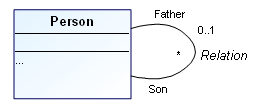
If there is association of an entity with itself, the roles need to be named in order to distinguish between the corresponding links in the drawing.
“Father” and “Son” are the two roles played by the “Person” entity in the “Parent” association.
A role enables indication of one of the entities concerned by the association. Indication of roles is particularly important in the case of an association between an entity and itself.
You can segment a line by adding joints to modify its path. You can in particular segment a role to avoid an obstacle for example. You can also change the line to a curve.
To produce a curved line:
1. Select the association.
2. In the toolbar "Edit", click Curved line. The link now curves at each joint.
Displaying an N-ary Association
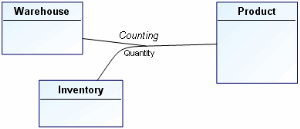
Certain associations associate more than two entities. These associations are generally rare.
Example: When taking inventory, a certain quantity of product was counted in each warehouse.
To create a ternary association:
1. Create the association between two entities.
2. Click the
Association Role button

and connect the association to the third entity.