Association Roles
An association is a relationship that exists between two or more classes. It is possible to describe the different roles played by the classes in associations
Order
It is possible to specify whether or not a role is Ordered. For example, for a client order, it can be useful to store the sequence in which its lines appear.
To order a role:
1. Right-click the role concerned and select Properties.
The properties window of the role appears.
2. Click the drop-down list then Characteristics.
3. Select the is Ordered check box.
For example, each square on a chessboard is identified by its row number and column number on the chessboard.
Using Association Classes
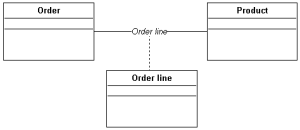
It is helpful to create an association class in order to specify the characteristics of an association.

An association class is an association that also has class properties as attributes.
For example, the quantity of the requested product needs to be specified on each order line.
To create an association class:

In the class diagram, create the class and, using the
Link button, connect the class to the association.
The association class now appears in the drawing, linked to the association by a dotted line.