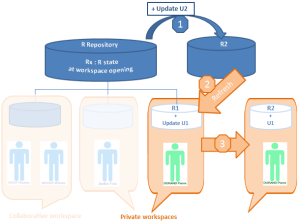
Refreshing Data
A user can see modifications dispatched by other users of this repository without dispatching his/her own modifications. To do this, the user refreshes his/her data.
A user can refresh his/her data:
• from his/her private workspace
The system creates a new private workspace, into which the
private workspace log of the user’s previous modifications is automatically imported.
Refreshing allows a user to incorporate repository and system repository changes made by other users, without dispatching current work.
• from a collaborative workspace.
The system then creates a new collaborative workspace for all participants in the collaborative workspace, into which is automatically imported the collaborative workspace log containing modifications previously made by participants.
 MEGA
MEGA recommends that you warn other participants before executing refresh.
Refreshing allows a user to incorporate repository and system repository changes made by other users, without dispatching current work.
Refreshing a private (or collaborative) workspace.
• does not update repository or system repository state.
• does not unlock objects modified in the private workspace.
When a user resumes work on his/her private space that has lasted longer than the limit set by the administrator (the default is 6 days), MEGA proposes that the user refreshes or dispatches his/her work.