Modifying Writing Access Areas of an Object Group
If you have a writing access area of level higher than or equal to that of an object group, you can modify the writing access area of this object group.
To modify the writing access area of an object group:
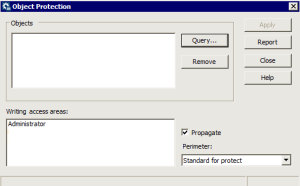
1. From your MEGA workspace, select Tools > Manage > Protect Objects.
The Protect Objects dialog box opens.
2. In the Objects frame, click Query and select the object group.
3. In the Writing Access Areas frame, select the writing access area you want to assign to the object group.
4. (Optional) Select Propagate if you want the writing access area to be propagated to all dependent objects of the object group, as a function of the perimeter selected.
5. Click Apply.
Object protection is applied.
6. Click Report to check if a conflict has been encountered at protection propagation in the repository.