Creating an Environment
To create an environment:
1. Connect to MEGA Administration.
2. In the navigation tree, right-click Environments and select New.
3. Enter the Name of the new environment.

The environment name must respect Windows folder naming constraints.
4. (Optional) To modify the default environment location, click Browse.
5. 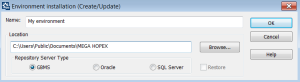
Select the repository server type for the new environment.
Possible server types are: GBMS (
MEGA) and RDBMS (Oracle and SQL Server). For more details on
MEGA repository server type, see the
MEGA deployment guide.
6. Click OK.
Creation and installation of the new environment are started.
(GBMS) The SystemDb repository is rebuilt and environment creation takes several minutes.
(RDBMS) The SystemDb repository is built dynamically and environment creation can take several hours.
A directory is created. It hosts the environment structure.
When you create a new environment, it is automatically referenced, and it appears in the list of environments.
The environment is identified by the complete path of its root directory. It is therefore essential that all users see the network resource in which it is located under the same name.