Consulting Environment Reading Access Information
When working in MEGA you can check:
• if reading access management is activated in your environment or not.
• the reading access area to which the connected user belongs.
To consult reading access information of your current environment:
1. From the MEGA menu bar, select Help > About MEGA.
The About MEGA dialog box appears.
2. Click System Information.
3. In the menu bar of the System Properties dialog box, select System Info > Edit.
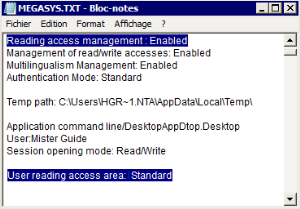
The Megasys.txt text file opens.
At the beginning of the file you can consult the properties of:
• Reading access management
• Reading access area of the user