Concepts
Chapter
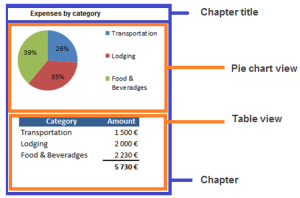
The chapter creation is based on either a macro, a view, or a set of views that can be combined together (Grouped views).
The chapter organization and display is defined through these macro, view, or set of views.
Macro
Chapters can be implemented using a Java macro.
See Writing Java Report Chapters Technical Article.
View
A view is a chapter area that shows a set of values (Data Structure) displayed graphically or not according to the Renderer type selected
Organization
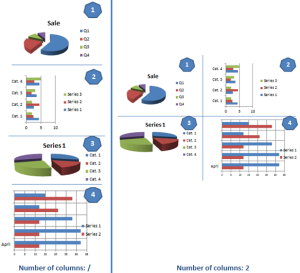
The chapter views are organized in line. By default the views are displayed in a single column.
You can include several views (Grouped views) in a single view. You can organize the Grouped views in several columns in the same line (specified through the Number of columns).
The following displays four grouped views in a single column (Number of columns field empty) and the same four grouped view in two columns (Number of column field value = 2):
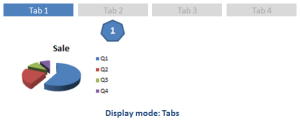
You can change the Display mode grouped view for “Tabs”, for example when your views are two large to be displayed in several columns.
Content
Each view includes either a set of views, or a content.
This content is described with:
• a Data structure, which defines the set of processed values, and
• a Renderer type, which defines the processed value display.
A view can be associated with several renderer types, which enable several displays (in tab display) of the same data structure.
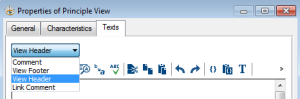
A view can also have a Header and Footer text that wil be displayed
Renderer types
The available renderer types are the following:
• areachart
• barchart
• linechart
• list
• gauge
• piechart
• radarchart
• table
• verticaltexttable
Data structure
The data structure provides the data to the renderer type. The data structure can include as many headers as needed by the render type. The renderer type choice defines the header number.
Data structure headers are made up of either:
• a set of business occurrences (e.g.: applications of the portfolio used as a report parameter),
• a set of attribute values (e.g.: application types),
• attributes, or
• character strings (e.g.: code templates),
Header number examples:
• a single header: list, piechart
• two headers: table, stacked bar, linechart:
Data headers
Report legend is built from headers.
The data structure header consists of a set of items.
Examples:
The « Application category » header, for which items correspond to several application categories.
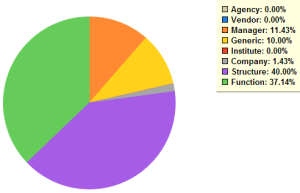
Org-units sorted according to each org-unit type as shown in the following pie chart (header: Org-units, header items: org-unit types).
These items are processed to feed one of the table or graph axes.
This set of header items can be explicit, provided by a query or a MetaAssociationEnd, or retrieved from input parameter.
Data Header Kind attribute defines how the header items are retrieved:
• Header With Provider
Header items are occurrences provided by a collector (Data Header Provider). The collector is a query or a MetaAssocitionEnd).
The set of header items is computed (Provider). The computation is based on either:
o a query with or without parameter.
If the query includes a parameter, the set of elements is fed from a report type input parameter associated with the header (necessarily an occurrence).
Example: with a parameter associated with a “Portfolio” header type, the “Application of ptf” query enables to retrieve these header items, which are the portfolio applications.
o a MetaAssociationEnd, which is used to retrieve a set of occurrences linked to the occurrence, which is a header parameter.
o a tabulated value attribute/abstract property: values are directly exploited as as many header items.
Example: with the « audit plan categories » attribute, header items are made up with the different values of the audit plan categories, in the order that linked them to their attribute.
• Explicit header Items
Each header item is described by an attribute with a unique computation for all of them.
The value displayed by the renderer type is the MetaAttibute name, but you can overload it by using the _guiname of the item.
Example: the following explicit header items are based on attributes.
• Explicit header Items with computation
Each item is described (name and corresponding attribute) and a specific Data Computation is applied to each of them.
Data computation
Each report value is computed from current header items (one item for a single-header structure, two items for a two-header structure). You can use a global computation to retrieve the report values or use a specific computation for each header item.
Example of a computation applied to two headers:
The computation mode of each table cell content can be either identical for all of the cells, either specific for each header item.
Data Structure | Item 1 | Item 2 |  Item 3 |
Occurrence 1 |   xxxx |  xxxx |  xxxx |
Occurrence 2 |  xxxx |   xxxx |   xxxx |
Data computation steps
The data computation is performed in three steps. The first two steps collect the data that will be the input of the method, the third one performs the computation with the given method.
These steps are activated or not according to the computation method chosen.
• Collection and global computation: data collection and computation are applied regardless of header items. When a header item is not explicitely described, only a global computation is possible.
• Collection and item-specific computation: data collection and computation are header item- specific. The item-specific computation is only possible when header items are explicitly described, in that case all of the items must have a computation, possibly the same one.
Data collection steps - Input and Provider
The data collection is built either directly by the specified input data, or by a provider that uses an input.
• input data
Input data can be given by a report parameter or by a header (meaning the associated occurrences) or by an item.
or
• collected data
In that case the Provider checkbox must be selected. The Provider collects occurrences using:
o a query
The query can have 0 to n parameters. These parameters are the occurrences specified as input. Parameters refer to only one occurrence, but in case of collection, the query is executed n times and the result is aggregated.
or
o a MetaAssociationEnd (applied to occurrences specified as input).
The query includes at least one of the following parameters (or none if there is no input):
o report parameter: the provider input is one (or n) occurrence(s) of a type specified for the parameter.
o header: the provider input is the occurrence of type associated with the header. If the header is fed through a query or a MetaAssociationEnd, it is the type specified by the query target or by the MetaAssociationEnd. In other cases, it is the type of the parameter associated with the header. If there is no parameter associated with the header it is the type of the parameter associated with the dataset.
o item: the provider input is the occurrence associated with this item. If this item is based on a provider it is the type of occurrence in output of this provider, else the type is determined by the header.
Computation step - methods
The following computation methods are provided, they are performed on each cell and can take the following values:
• Attribute Value
Gets the value of the attribute on the occurrence(s) defined as input.
• Condition
Executes a MetaTest on the object instance defined as input
• Method
Executes the computation code on the occurrence(s) defined as input.
Delivers the value processed by the renderer type for the cell addressed by the n current elements (one element by header)
The computation code includes key words and enables to filter the occurrence collection and/or to perform calculation on these occurrences.
This code enables to:
o use the object collection defined as input as a typical MegaCollection (browsing, count, etc.)
o use calculation functions on an attribute of this collection: Average, Sum, Min, Max…
o modify a cell color (when available with the renderer type).
The following output value types are available:
• object
• collection of objects
• numerical value
• boolean
• text
• date
The following display formats are available:
• stored currency (data entry)
• default currency
• specific currency
• %
• Image (of the object)
When the computation result is a numerical value, the set of occurrences that were used for computation is accessible through drill-drown. You can overload or define this collection in the computation text.